
SUMMARY
In this release, we’re rolling out updates that make your workflow smoother, clearer, and easier to navigate:
- Intake: Medical & vision insurance support — Show accepted insurance types with dedicated sections
- Intake: Required emergency contacts for minors — Enforce emergency contact fields based on age
- Insurance Pro & Premium: Verification source visibility — See where insurance data originates
- SR Schedule: Insurance capture & reporting (Beta) — Payer dropdowns, richer data, and UTM tracking
- SR Pay: Full-amount authorization only — Eliminate partial payments
- System enhancements & fixes: Improvements to intake, notifications, scheduling, payments, and reporting
Watch the 1.4 Release Overview Video

Intake – Medical and Vison Insurance Options for Eye Care Practices
Eye care practices can now select and display both medical and vision insurance types in patient intake forms, making it clear to patients which insurances are accepted. The intake form and PDF have updated sections for Medical and Vision Insurance, with improved UI alignment and labeling for clarity.
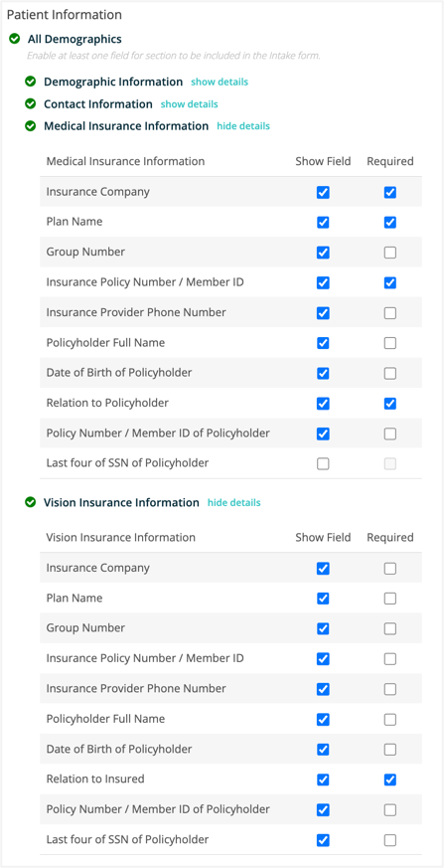
Intake – Allow Emergency Contact Required if patient is a minor
Emergency contact fields are now able to be required in Intake for patients identified as minors, based on date of birth and packet builder settings. This update ensures emergency contact information is collected for minors, while adults are not required to provide it unless specified.
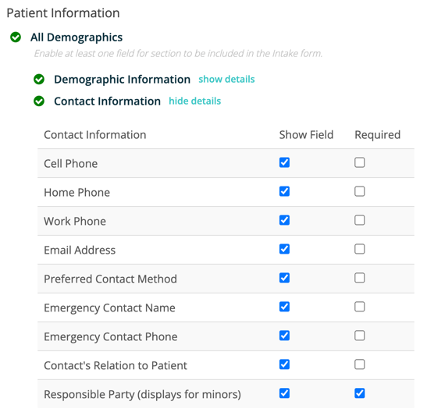
Intake – Consistent options on demographics
Demographic options in intake packets now have consistent required and read-only settings for Preferred Name, Ethnicity, and Relation to Insured fields. These changes apply to both Location Hub and single-office packet creation, ensuring a more predictable and user-friendly experience.
Intake – Removed “Spread of germs” from email intake template
The email intake template was updated to remove the phrase “spread of germs” and now states, “These online forms help streamline your check-in process and reduce wait times.” This change reflects current office preferences and removes outdated COVID-era language.
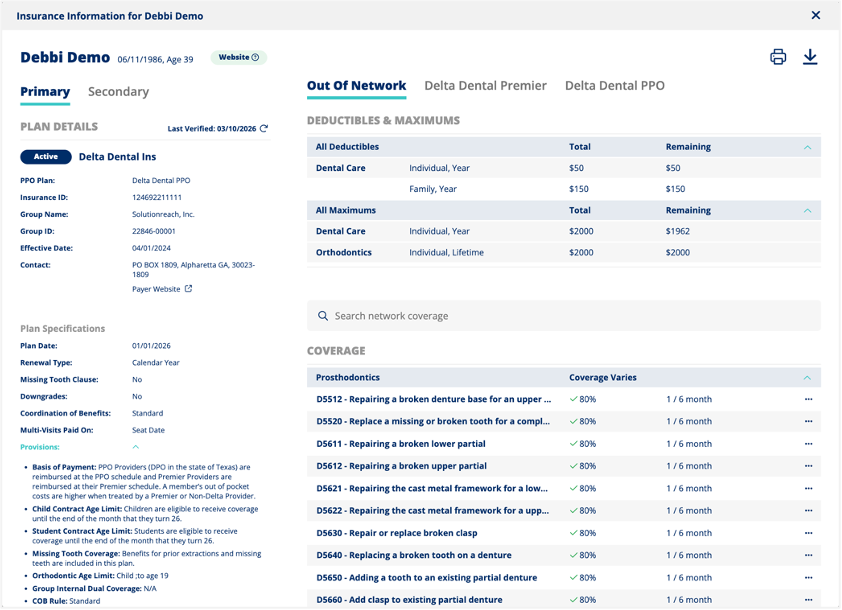
Insurance Pro & Premium – Show verification source and expand views
Dental Insurance snapshots now display the verification data source (Website or EDI) at the top, with detailed help text available in a modal. This helps users know where the information was collected. Provisions, Deductibles, and Maxes sections are expanded by default for easier access to key information.
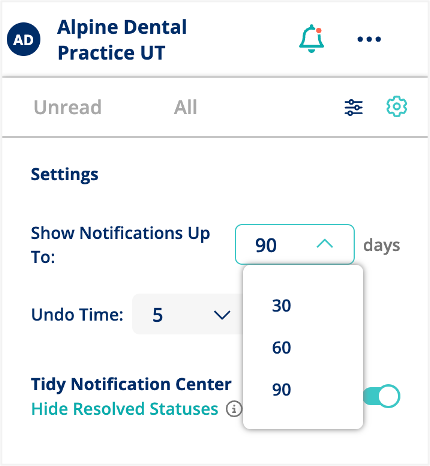
Notification Center – Apply history limit to displayed notifications list
The notifications panel now displays only notifications from the last 30, 60, or 90 days, matching the badge count logic and user-selected time range. Notifications older than 90 days are automatically marked as read, and those older than 6 months are deleted to keep the list current, consistent, and to improve performance.
SR Pay – Do not Allow Partial Authorizations
Partial authorizations for payment requests are now disabled for both terminal and card-not-present transactions. Transactions will only be approved if the full amount is available, preventing partial payments from being captured.
SR Pay (beta) – Toggle for automated ledger write-backs settings (OpenDental PM Only)
A new toggle has been added to control automated ledger write-backs. When turned off, related settings are disabled and automated ledger entries are prevented, reducing the risk of incorrect financial data and lowering manual correction needs.
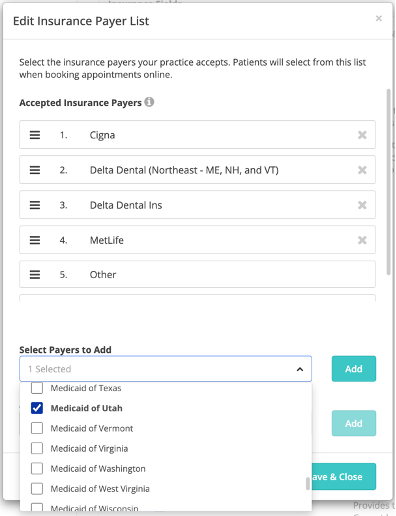
SR Schedule (beta version only) – Dental Insurance Payer dropdown in Settings
The Schedule Settings for U.S. Dental users now include a dropdown for selecting insurance payers, allowing practices to require patients to choose from supported providers and/or add custom entries. This update improves the accuracy of insurance information for office collection, verification calls, and enhances the user experience with a redesigned, more intuitive interface.
SR Schedule (beta version only) – Dental Insurance Payers on SR Schedule Patient Form
The U.S. Dental SR Schedule Patient Form now includes an insurance payer dropdown, allowing patients to select a payer from office‑configured lists or from Insurance Pro and Premium supported payers.
- If the practice uses an insurance picklist and the patient selects “Other,” patients can search the insurance list or manually enter a payer.
- If the practice does not use a picklist, patients will see the insurance search list and can manually enter an insurance name if needed.
This enhancement improves insurance data accuracy, helping offices with more efficient insurance collection and verification calls.
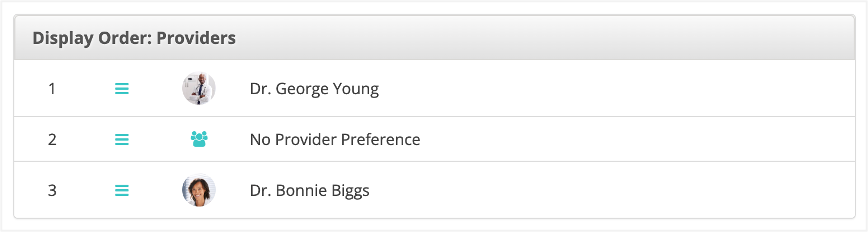
SR Schedule – No Provider Preference Added to Display Order options
The provider display order in the scheduler now includes a “No Provider Preference” option, which users can position as needed. The scheduler interface has also been updated for improved usability, making appointment requests more intuitive and accessible.
SR Schedule – Additional data points added to Notification Center
The notification tile for SR Schedule Pro and Basic appointment requests now displays all information provided by patients during booking, including new insurance fields, self-pay status, referral source, and vision eyewear details. This update helps users easily access and record all relevant patient data from appointment notifications.
SR Schedule (beta version only) – UTM added to the SR Schedule Appointment Request Report
The SR Schedule Appointment Requests Details report now includes UTM tracking columns and additional insurance fields, allowing users to better track appointment sources and insurance details. These updates are available on both the report screen and in downloaded reports.
SR Schedule (beta version only) – Show phone number for both terminologies
The office phone number now appears on the success screen after submitting an appointment request in both Schedule Pro and Basic, regardless of whether the terminology is set to “Book” or “Request.” The footer, including the phone number, has also been added to all pages of the new SR Schedule experience for improved consistency and patient support.
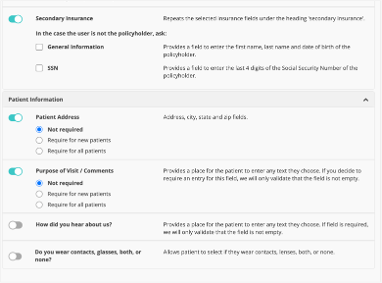
SR Schedule – Additional Form Options Settings
Location Hub – Don’t allow group deletion if newsletter is scheduled and assigned to group
Groups in Location Hub can no longer be deleted if they are assigned to a scheduled newsletter or campaign. Users will see a warning modal listing the assigned campaigns or newsletters, and deletion is blocked until the group is unassigned from all scheduled items.
Location Hub – Opt-Out Report updates
The Opt-Out Report now includes “Last Message” and “Message Name” columns, showing which specific messages caused patients to opt out via email or text. This update helps users identify trends and improve patient communications.
Location Hub – Updates to Newsletter Detail report – download
The Newsletter Detail Report now shows the unsubscribe percentage for each newsletter, both in the UI and in downloaded reports, calculated as unique unsubscribe clicks divided by total newsletters sent. This update helps enterprises track which newsletters lead to unsubscribes and improve their content accordingly. The fix for appointment value logic will be addressed separately.

SR Schedule – not releasing “Not Scheduled” resolved status appts
Resolved an issue where appointment times marked as ‘Not Scheduled’ were not being released back to the SR Schedule, causing them to remain unavailable for other patients. The appointment request report now correctly updates the status from Pending to Not Scheduled, restoring expected scheduling functionality.
SR Pay – Unable to process refunds
Resolved an issue where users could not process refunds in conversation due to the type of card used by the patient. This update ensures refunds can now be completed for all payment methods without error.
SR Pay – Terminal transactions not showing in SR Conversations, approved in Payrix, failed at terminal
Resolved an issue where certain terminal transactions appeared as failed on the terminal but were authorized in Payrix and missing from Conversations. Updated the system to correctly handle new entryMode values, ensuring all transactions are properly processed and displayed.
SR Pay – When processing payment via SR Conversations their receipt is not opening in a new tab to be printed.
Resolved an issue where payment receipts were not opening in a new tab for printing when processing payments via SR Conversations. With this update, selecting the Print Receipt option now consistently opens the receipt in a new tab, allowing users to print immediately.
Patient Profile – Unable to see a patient information on SRP
Fixed an issue where patient demographic information was not displaying on SRP profiles for patients enrolled in CareCredit. Patient profiles now correctly show all demographic details as expected.
Location Hub – Confirmation Response setting not appearing
The “Auto-respond to appointment confirmations” setting is now available in Location Hub Delivery Settings at the enterprise level. This update ensures the setting is retained and manageable when propagating delivery settings, preventing it from being disabled during updates.