
Your group has already automated plenty. Reminders go out. Online booking is live. Payment links get sent after visits. On paper, the stack looks modern.
But your staff still toggle between five systems to close out a single patient visit. Someone is still reconciling the schedule against the ledger every week. A patient books online, and the confirmation fires from a different platform than the one that owns the calendar. The automation is real. So is the fragmentation.
That is the core problem with how most multi-location groups have approached healthcare automation software: one tool at a time. Each tool works. The handoffs between them do not.
As you add locations, it becomes harder to manage scheduling, patient communication, payments, and analytics across separate systems. The challenge is not finding another tool. It is creating connected workflows that reduce manual work and give your team a clearer view of operations.
Why Point Solutions Stop Working at Multi-Location Scale
Point solutions have a ceiling, and most multi-location groups have already hit it.
Here is what that looks like in practice:
- Every disconnected tool creates a manual handoff. Staff become the integration layer between systems that were never designed to talk to each other.
- Patient data ends up in three places, none of them complete. Reconciliation eats hours every week.
- Locations adopt tools differently. A workflow that runs smoothly in one office breaks the moment a different manager is running a different version of it somewhere else.
- Reporting becomes guesswork because the underlying data lives in five systems with no common view.
- Vendor management itself becomes a job: five contracts, five invoices, five support queues.
The problem is not the tools themselves. It is the gaps between them, and at multi-location scale those gaps compound fast.
What End-to-End Healthcare Workflow Automation Really Means
True healthcare workflow automation is a connected system that links scheduling, communication, payments, and recall so information moves from one step to the next without staff having to transfer it between systems.
In practice, that means:
- Booking, reminders, intake, visit, payment, and recall all live on the same system. One trigger fires the next step without anyone manually picking it up.
- Staff act on exceptions, not routine touches. Confirmations, follow-up messages, and payment reminders can be sent automatically based on where the patient is in the workflow.
- Information entered once is available throughout the workflow, reducing duplicate data entry. The schedule, the chart, and the ledger agree.
- Workflows are standardized across locations, with room for local variation where it actually matters.
The most effective automation platforms are not necessarily the ones with the most features. They are the ones that keep scheduling, communication, payments, and reporting connected so your staff are not constantly reconciling information across systems.
Sending a reminder automatically is helpful. Connecting scheduling, communication, and payments into a coordinated workflow has a much larger operational impact. The difference is whether staff still have to manage the handoffs between systems.
Why Scheduling Starts the Automation Flow
Scheduling is the first event in the revenue cycle. Everything downstream, including the visit, the payment, and the recall, depends on it being right.
- Missed and abandoned calls represent appointment demand the practice already earned but failed to capture.
- Automated confirmations, reminders, and rescheduling tools help reduce no-shows while keeping the schedule up to date.
- When scheduling is connected to communication and payments, the next steps in the workflow trigger on their own.
How Solutionreach Helps
Solutionreach delivers automated scheduling at the front of the workflow, including Virtual Scheduling Assistant for 24/7 call coverage and online scheduling that books directly into the practice management system.
👉 Explore the Scheduling Workflow →
How Payment Automation Closes the Revenue Loop
Most groups automated the front of the workflow first. Payment collection still depends heavily on phone calls, mailed statements, and manual follow-up.
Patient balances age faster than insurance receivables. Every day a balance sits, the odds of collecting it drop. For most groups, collections are not just a staffing problem. They are a workflow problem.
Revenue cycle benchmarks generally recommend keeping accounts receivable at 30-40 days or less, making timely patient payment workflows an important part of maintaining healthy cash flow.
- Text-to-pay makes it easier for patients to pay when they receive a balance, reducing the need for repeated follow-up from staff.
- Automated statements go out on a schedule, not when someone remembers to run the report.
- Stored payment methods eliminate the phone tag entirely for established patients.
How Solutionreach Helps
When balances are shared at the right moment in the patient journey, practices can collect sooner without adding more follow-up work for staff. Patients get a clear, convenient path to pay, and teams spend less time chasing balances.
👉 Explore the Payments Workflow→
How Analytics Show Whether Automation Is Working
Without clear reporting, it is difficult to know whether automation efforts are actually improving performance. Leadership has no way to prove the stack is paying for itself, and no way to know which location is underperforming before the monthly report.
Real measurement requires data from scheduling, communication, payments, and the practice management system in one view, not five open tabs. You need:
- Leading indicators like booked appointments, response rates, and time to pay that catch issues before month-end.
- Consistent comparisons across locations using the same performance measures.
- Visibility into true profitability, not just production.
The challenge is not collecting the data. It is seeing it all in one place.
How Solutionreach Helps
Solutionreach, in exclusive partnership with OS Dental, pairs the automation layer with a dedicated analytics tool that works alongside it, giving multi-location groups one view of scheduling, communication, payments, and profitability across every location.
👉 Request a Free Workflow Assessment →
How to Evaluate Practice Automation Tools for Multi-Location Groups
When you are looking at platforms, these are the questions that actually matter:
- Does it cover the full patient journey, or only one or two steps of it?
- Do scheduling, communication, payments, and analytics actually share data, or do they just sit under one brand?
- Does it integrate with your PMS, so the schedule and ledger stay in sync without manual reconciliation?
- Does it standardize workflows across locations while allowing local flexibility where you need it?
- Does the vendor consolidate tools you are paying for separately today?
- Does it scale as you add locations without a full rip and replace?
How Solutionreach Helps
Solutionreach is the integrated automation platform for multi-location healthcare groups, with scheduling, communication, and payments.
Frequently Asked Questions About Healthcare Automation Software
Q: What is healthcare automation software?
Healthcare automation software helps practices manage activities such as scheduling, reminders, patient communication, payments, and reporting. More advanced platforms connect these functions so information moves between steps without requiring manual intervention.
Q: What is the difference between task automation and healthcare workflow automation?
Task automation handles one step in isolation, like a reminder or a form. Healthcare workflow automation connects steps so each one triggers the next. The difference is whether staff still carry work between systems or the platform does it automatically.
Q: Which workflows benefit most from practice automation tools?
Workflows that affect nearly every patient typically offer the greatest opportunity for improvement. Examples include scheduling, appointment confirmations, recall outreach, payment collection, and balance follow-up.
Q: How does payment automation fit into the patient journey?
Payment collection often remains one of the most manual parts of the patient journey, even when other workflows have already been automated. Automated text-to-pay, scheduled statements, and stored payment options close the loop without requiring staff phone calls.
Q: How do multi-location groups measure ROI on automation?
Organizations often measure ROI through improvements in appointment volume, collection rates, staff efficiency, and technology consolidation.
Stop Paying for Disconnected Automation Twice
Most multi-location groups have already automated the basics. Reminders go out. Online booking works. The challenge now is what happens between those tools: manual handoffs, reconciliation work, and reporting that requires piecing together information from multiple systems.
Adding more tools rarely solves those problems. The bigger opportunity is connecting scheduling, communication, payments, and analytics so information moves through the workflow without staff constantly bridging gaps between systems.
If your team is still the integration layer between scheduling, communication, payments, and reporting, you are paying for automation twice. See how Solutionreach connects the full patient journey across every location.
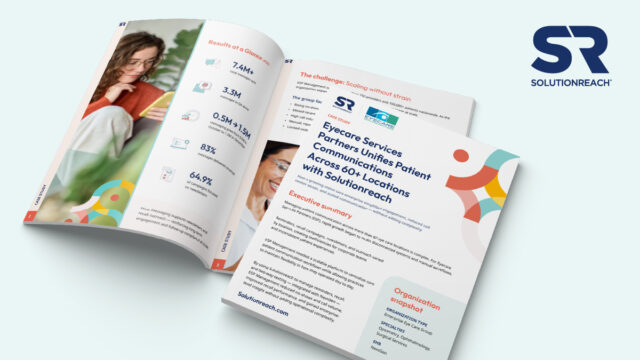
How do 60+ locations standardize patient communication without overwhelming staff?
👉 Download the ESP case study to see how unified workflows reduced no-shows, lowered call volume, and scaled engagement across 200+ providers.