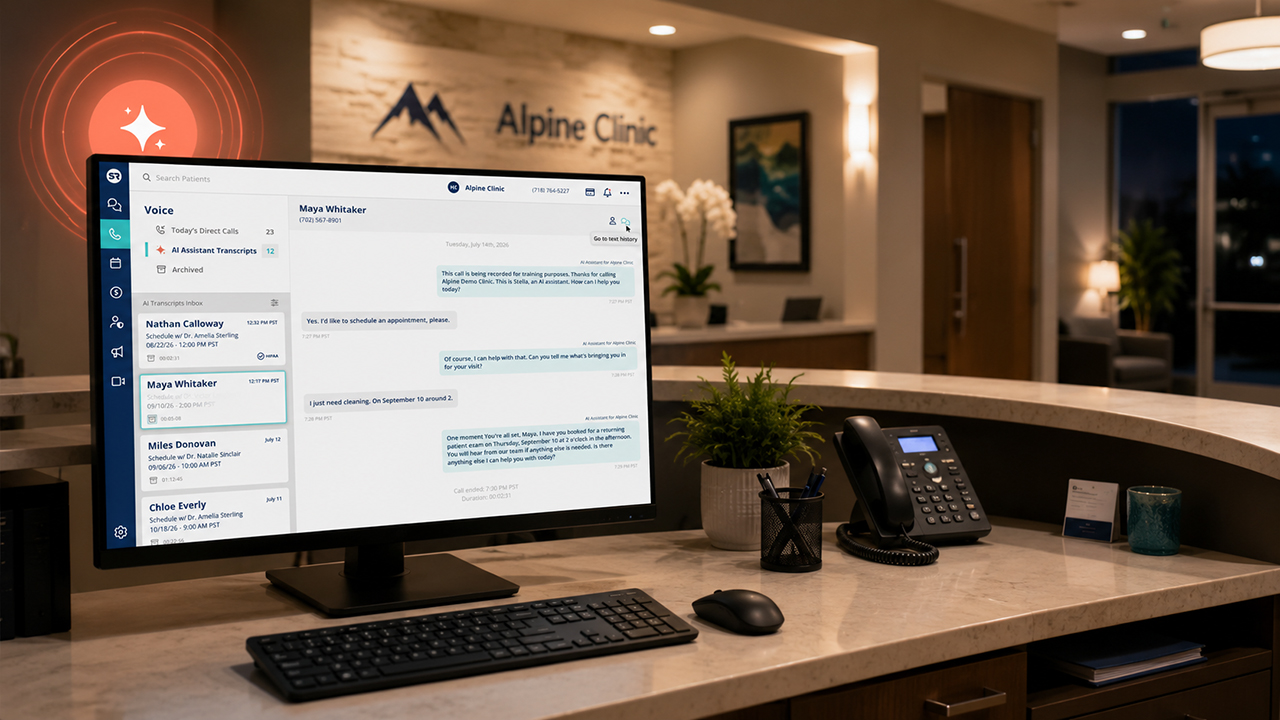
Most calls coming into your practice are to schedule an appointment. Patients want to reach someone, get their appointment booked, and move on with their day. They don’t want to get stuck on hold, sent to voicemail, or have to try again later.
Most practices already know missed calls are a problem. The bigger question is what changes inside your practice when you decide to address it. What does that look like for your team, your patients, and the way your schedule gets managed?
Here are the questions practices most often ask about Solutionreach’s AI-powered Virtual Scheduling Assistant, along with straightforward answers to help you think through what this could look like for your practice.
Does Virtual Scheduling Assistant sound robotic?
Less robotic than most people expect. The assistant is designed to sound natural and clear, and many practices are surprised by how normal the scheduling conversations feel once they’re live.
Patients calling to schedule are focused on getting their appointment booked. When that happens smoothly, they usually aren’t thinking much about how it happened.
What they do notice is whether every call feels consistent, clear, and handled well, whether they call at 10 a.m. or after your office has closed. That consistency shapes the patient experience over time and helps your practice feel more reliable and reachable.
What happens if a patient asks something the assistant can’t answer?
The call gets routed to your team. Your practice decides which calls the assistant handles and when they should be passed to staff. If a call goes beyond routine scheduling, like a clinical question, a billing issue, or anything else that needs staff attention, it gets passed to the right staff member.
The assistant handles workflows like booking, rescheduling, cancellations, and confirmations. Anything outside that follows your patient call routing and automated scheduling escalation rules.
Not every call needs to go through the assistant for it to make a real difference in your daily call volume. The goal isn’t to automate every call. It’s to take routine scheduling work off your team’s plate so staff spend more time on the calls that actually need their attention.
How long does it take to get a Virtual Scheduling Assistant live?
Most practices start with one workflow, often after-hours scheduling, and build from there. Implementation is usually gradual.
Setup typically includes:
- Confirming your existing call routing
- Scheduling configuration
- Test calls
Automated scheduling onboarding connects with supported practice management and EHR systems. Your staff are involved in the healthcare scheduling setup from the beginning, and nothing goes live until your team is comfortable with how it works. The rollout is usually phased and doesn’t disrupt how your practice runs.
Can my front desk team still control scheduling?
Yes. Your practice defines the scheduling rules and parameters, and your team keeps visibility into appointments and interactions. You can review transcripts, outcomes, and adjust coverage at any time.
Automation works best when your practice stays in control. Your team sets the rules, reviews what’s happening, and can make changes anytime.
Is this meant to replace front desk staff?
No. This isn’t about replacing staff. The Virtual Scheduling Assistant is designed to help cover the gaps your team runs into every day.
For most practices, the question isn’t scheduling automation vs hiring. It’s how to reduce the routine scheduling work that pulls staff away from the patients in front of them. That usually looks like:
- After-hours calls
- Overflow during busy call periods
- Repetitive scheduling requests
- Coverage gaps when staff are unavailable
Your staff still handle patient relationships, complex conversations, and anything that needs a real person. These front desk support tools are meant to reduce the constant interruptions that pull your team in different directions and help improve staffing coverage.
When your staff aren’t managing a backlog of routine scheduling calls, they can give their full attention to the work that actually requires them.
What does a Virtual Scheduling Assistant actually help with?
It helps with the automated appointment scheduling tasks that take up the bulk of your front desk’s day. That includes scheduling, rescheduling, cancellations, and confirmations. That’s the day-to-day work, not the more complex calls that need your staff’s judgment.
For most practices, the day-to-day impact is less voicemail buildup and less repetitive phone work. Your patients can get through when they call, and your practice stays reachable during busy periods and after hours, when calls would otherwise go unanswered.
Is patient information secure?
Yes. Patient scheduling conversations can involve protected health information, so security matters.
The Virtual Scheduling Assistant follows the same healthcare privacy standards your practice already uses for other communication workflows, including the protections you’d expect from HIPAA-compliant scheduling tools.
That means healthcare scheduling security includes access controls, user permissions, and clear processes that help protect patient scheduling privacy. It can integrate with supported PMS/EHR systems, so scheduling data stays within the systems your practice already uses.
Your team controls who has access and how scheduling data is handled, so it’s worth evaluating it the same way you would any other patient communication system in your practice.
What kinds of practices usually start with automated scheduling support?
There’s no single type of practice that starts using automated scheduling support.
It usually starts when scheduling pressure becomes harder to manage. That might look like missing after-hours calls, dealing with healthcare phone overload, or trying to keep up during your busiest scheduling periods.
For some practices, it’s the constant front desk interruptions or coverage gaps when staff are out sick, on vacation, or on leave. For others, it’s missed patient calls that pile up faster than your team can return them.
If you’re managing multiple locations, consistency can become part of the challenge, too. Patients calling different locations shouldn’t have a different experience depending on which one they reach.
Scheduling support for healthcare practices usually starts by addressing the specific gaps causing the most pressure, then grows from there if it makes sense for your workflow.
Can patients still speak with a real person?
Yes. Virtual Scheduling Assistant handles routine scheduling workflows, but your practice controls when and how calls get passed to staff. If a patient needs to speak with someone directly, that path is always available.
The assistant isn’t meant to stand between your patients and your team. It handles the routine scheduling calls that don’t require a real person, so your staff are more available for the ones that do. Patients who need more than scheduling support can still reach the right person on your team.
What happens during busy call periods?
Busy call periods are one of the most common reasons practices start using automated scheduling support in the first place.
During peak scheduling periods, when your front desk is already on the phone or helping patients in the office, calls can go unanswered or get pushed to voicemail. Scheduling overflow support means those calls still get handled. Patients can still book, reschedule, or confirm appointments even when your team’s attention is elsewhere.
It’s one of the clearest ways Virtual Scheduling Assistant helps reduce front desk phone overload during the busiest parts of the day.
Recap: What to Ask About Automated Scheduling Support
These are the questions most practices work through before changing their scheduling workflows.
The goal is operational support for your team, not replacing them. Most practices start by solving one scheduling gap, see how it fits into their workflow, and expand from there if it makes sense.
The strongest results usually come from reducing scheduling friction and closing the gaps where missed calls make it harder for patients to get scheduled.
👉 See how scheduling support fits into your existing workflows →

How do 60+ locations standardize patient communication without overwhelming staff?
👉 Download the ESP case study to see how unified workflows reduced no-shows, lowered call volume, and scaled engagement across 200+ providers.