SUMMARY
In this release, we’re rolling out updates that make your workflow smoother, clearer, and easier to navigate:
- Eyewear Notifications: Now available in supported PMs
- Take Action Calendar: Loading indicator added
- Insurance: Continuous insurance login for Delta Dental and Cigna (20+payers)
- Intake: Packet PDF control for optional page breaks
- Location Hub: Campaign management (Beta) with improved newsletter sending
- Schedule: Redesign (Beta) with better accessibility and UTM tracking
- Usability improvements: For CareCredit, Intake, Huddle, and calendars
- Integration updates: For improved configuration and stability
- System fixes: Faster newsletter load, accurate insurance remaining amounts, smoother SR Schedule page loads.

Eyewear Notifications – Contact Lens Notifications
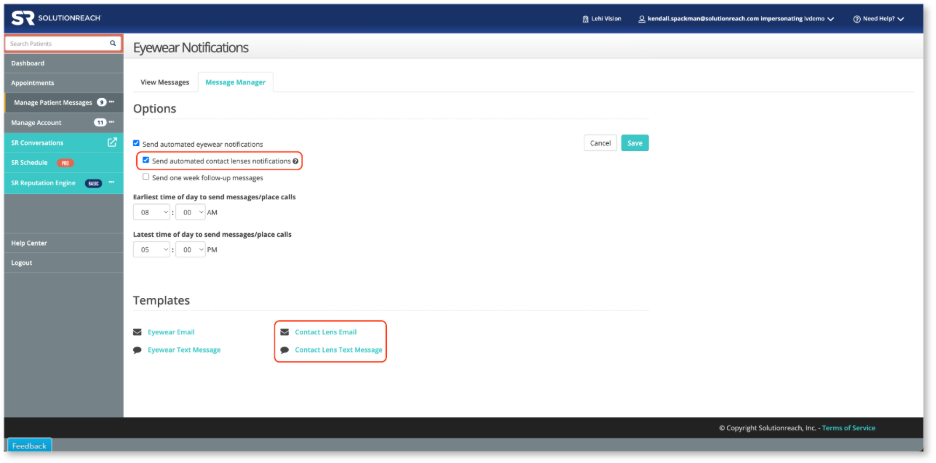
Contact Lens eyewear notifications are now available for supported PMs. This new message option allows users to have a template for Contacts along with a template for Glasses. Please note that Contact Lens notifications will only send if:
- Your sync provides eyewear type (glasses or contacts) to Solutionreach, and
- Send automated contact lens notifications is checked.
When the sync does not provide eyewear type, the Eyewear template will be used for all notifications.
Supported integrations:
- Compulink Eyecare
- Crystal PM
- Encompass
- My Vision Express
- Officemate
- RevolutionEHR
Learn more about enabling this message type here
 Insurance – Continuous Login for Delta Dental and Cigna
Insurance Premium users can now enable a continuous login experience for Delta Dental and Cigna, allowing Solutionreach to automatically sign in to payer portals and run insurance verifications on their behalf. Once enabled, this feature significantly increases successful verification rates and reduces the need for repeated logins or contacting insurance companies.
How it works
Practices add an SR-provided phone number as a multi-factor authentication (MFA) device in the payer portal. Solutionreach uses this connection to automatically log in and run insurance verifications as needed.
Important note for best results
To ensure continuous login works correctly across all supported payers, practices should only log in to Delta Dental Insurance and avoid logging in directly to any of the payers listed below. This allows those supported payers to also use the continuous login connection.
Expanded verification coverage
When Delta Dental Insurance is connected in Insurance Settings, a single login can be used to verify coverage across 20+ supported payers, reducing the number of individual payer connections required.
Supported payers include:
• Delta Dental Covers Me
• Delta Dental Northeast
• Delta Dental of Arkansas
• Delta Dental of Colorado
• Delta Dental of Idaho
• Delta Dental of Illinois
• Delta Dental of Iowa
• Delta Dental of Kansas
• Delta Dental of Massachusetts
• Delta Dental of Missouri
• Delta Dental of New Jersey
• Delta Dental of Oklahoma
• Delta Dental of Oregon
• Delta Dental of South Dakota
• Delta Dental of Virginia
• Delta Dental of Washington
• Delta Dental of Wisconsin
• Delta Dental of Wyoming
• Delta Dental Toolkit
• Hawaii Dental Service

 Intake – Page Break Option for Intake Packets
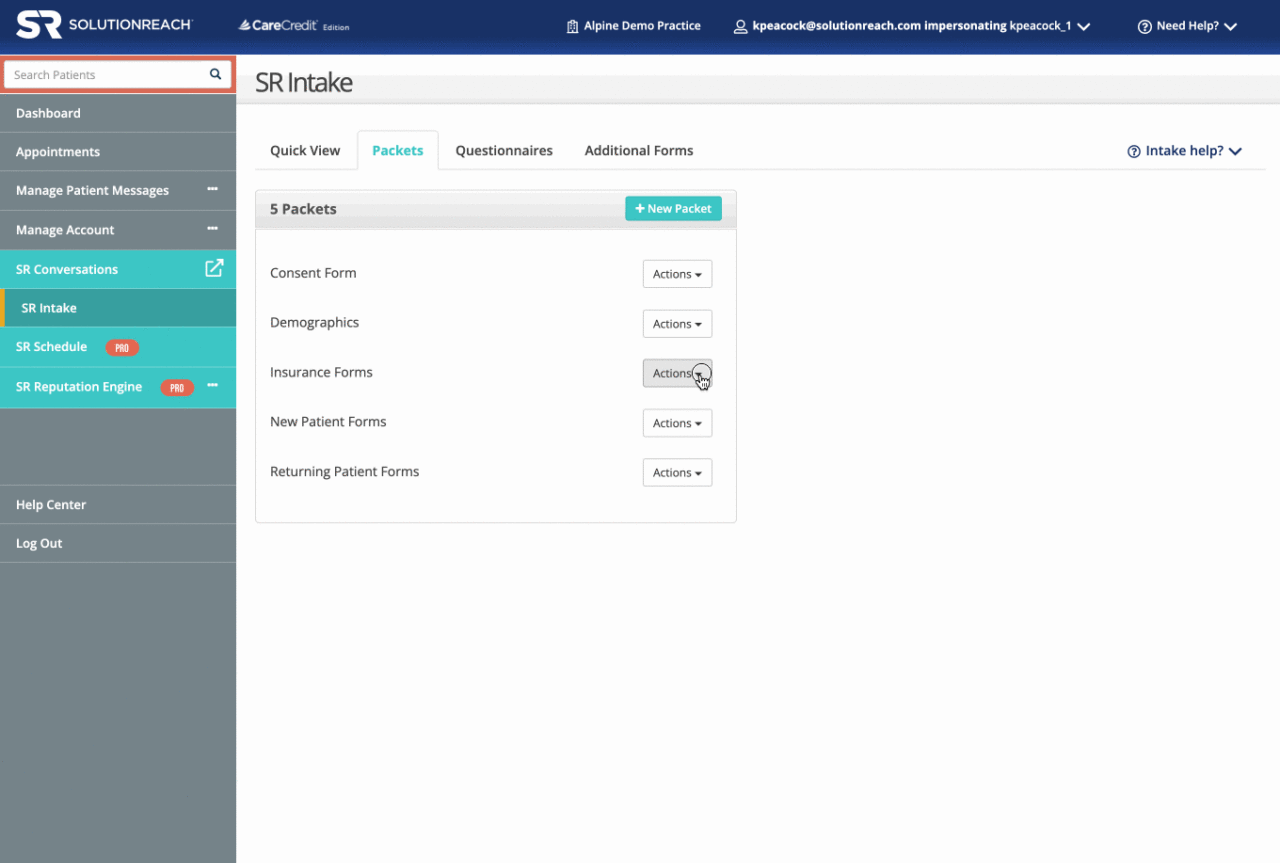
You can now control whether page breaks are included between questionnaires and forms in intake packet PDFs. A new option in the Included Forms section allows you to turn page breaks on or off. By default, page breaks remain enabled.
Location Hub – Campaign Management Now in Beta
Location Hub now supports creating, editing, and managing campaigns from start to finish at the Location Hub level. We’ve also improved newsletter delivery by adding controls that help manage sending volume.
SR Schedule – Redesign Now in Beta
SR Schedule has been redesigned to improve the overall patient experience, including more accessibility controls. SR Schedule will now track UTM links and display on our Location Hub SR Schedule report. When enabled, all SR Schedule links used within Solutionreach messaging will automatically point to the new experience. Any links used on websites/ads/etc. will need to be updated.

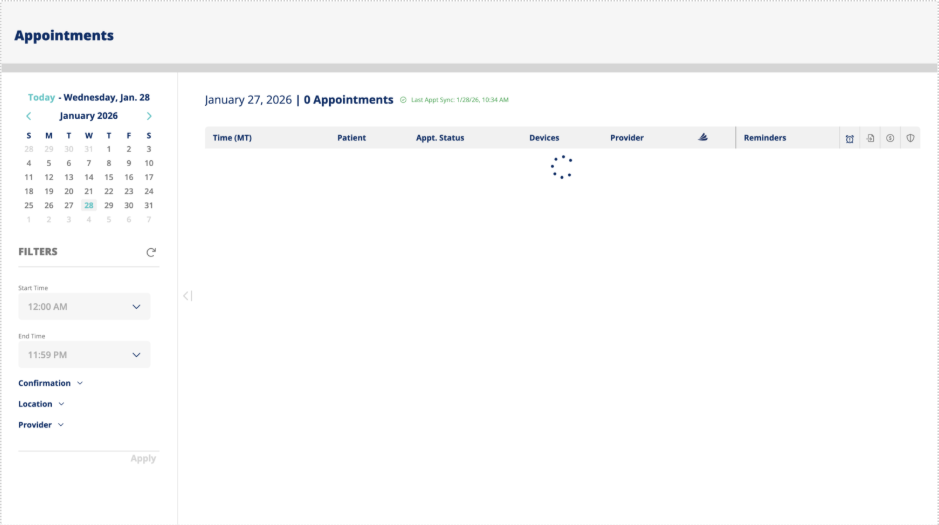
Take Action Calendar – Appointment Calendar Loading Indicator
A loading indicator has been added to the appointment calendar while data is being retrieved on initial load and date switching. This replaces the confusing, immediate display of “No Appointments Found.” Once loading completes, “No Appointments Found” will continue to display only for days without appointments.
Intake – “If Yes” Question Formatting
Standardized the spacing and formatting for “If Yes” questions across intake setup and PDF versions. The layout now matches the patient-facing intake forms, ensuring consistency and reducing unnecessary white space.
SR Intake – Save Draft Button for Unknown Patients
The Save Draft button will not be available for patients that we do not have the Name, Date of Birth, Address, Phone and/or Email address. Without this information we are unable to securely save the patient’s information and validate that information upon their return. This is only if the office sends an intake form directly to an unknown/new patient using Conversations Quick Messages. If the patient uses the generic URL/QR code to start an intake form, Save as Draft will be available.
Location Hub – User Group Message Controls (Non-SSO, SSO, and individual offices)
Introduced new permission controls for enterprise users to manage who can send group messages and restrict usage to corporate-approved templates only. Along with other UI updates to improve permissions management, responsive design, and overall usability.
Location Hub – Manage Messages UI Improvements
Improved the Manage Messages sub-menu on the Newsletters tab by enhancing contrast for readability and removing a redundant scroll bar, resulting in a cleaner and more accessible experience.
SR Schedule – Openings Report – Date Selection
Updated the SR Schedule Openings report to allow date selection through the end of February of the next calendar year. This resolves the previous limitation where future dates (such as 2026) were unavailable in Decemeber.
SR Schedule – Appointments Report Status Visibility
The Location Hub Appointments report now includes an “Appointment Status” column (Kept, Not Kept, Unknown, Kept Skipped). This ensures canceled and rescheduled appointments are clearly identified, improving reporting accuracy.
Insurance – Improved Eligibility Request Details
Eligibility requests now include the appointment date and patient ZIP code. This improvement helps ensure more accurate insurance responses and supports expanded insurance processing of verifications.
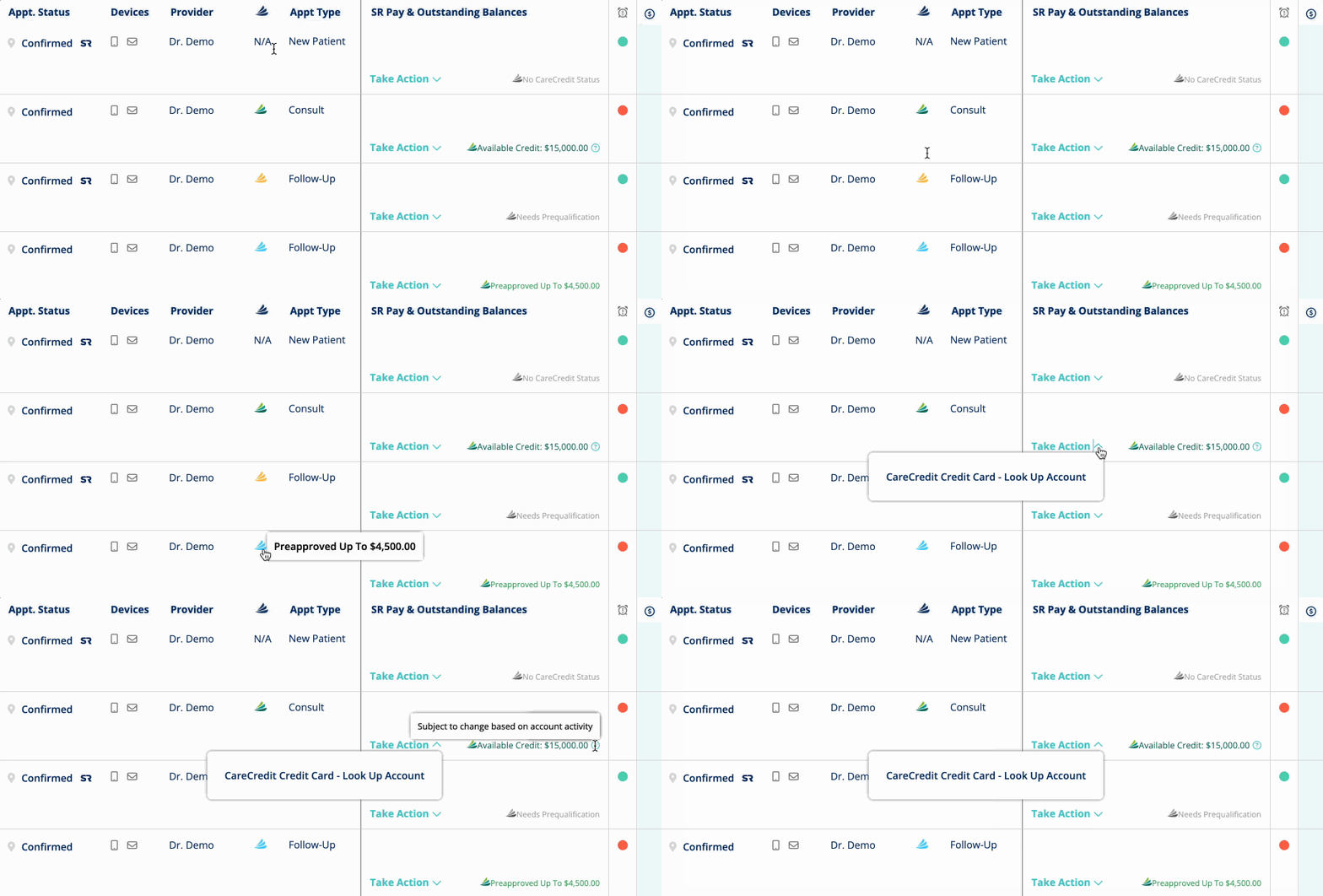
CareCredit – Add Patient Status Indicator to Take Action Calendar
Added CareCredit status icons to the Take Action Calendar, allowing users to quickly view a patient’s CareCredit status without clicking. Along with adding the new icon, we updated the TACal UI with changes to column headers, checkbox sizes, time formatting, and row layout for improved usability.

Reminders – Cancellations Syncing to Denticon 2.0
Fixed an issue where appointment cancellations made through text were not always syncing back to Denticon 2.0. All Cancellations initiated via text are now correctly written back and reflected in Denticon for all affected offices.
Insurance Premium – Payer Support Requests for Location Hub Users
Resolved an issue preventing Location Hub users from submitting insurance payer support requests. Users can now successfully submit requests for individual offices while logged in at the Location Hub level.
Location Hub – Newsletter and Practice Layout Image Uploads
Resolved image upload issues where duplicates briefly appeared or uploads failed. Images now upload and display consistently without duplication or missing content.
MFA – Location Hub User Enrollment
Fixed an issue where newly created Location Hub users were not automatically enrolled in MFA when it was enabled at the subscriber level. New users will now have MFA enabled as expected.
Recall – Email Template Errors
Fixed a server error that prevented some recall due and overdue email templates from being viewed or edited. Users can now access and modify these templates without interruption.
SR Pay – Ledger Status Update
Resolved an issue that prevented users from marking ledger entries as “Posted.” Ledger statuses can now be updated successfully.
SR Pay – Payment Email Notifications
Fixed an issue where practices were not receiving email notifications for payments made through SR Pay. Payment notifications will now be sent consistently.
SR Pay – Terminal Transaction Statuses
Resolved an issue where terminal transactions remained in an “Authorized” state after settlement. Transactions now correctly update to “Paid,” and previously affected transactions have been corrected.
SR Pay – Terminal Transaction Statuses
Resolved an issue where terminal transactions remained in an “Authorized” state after settlement. Transactions now correctly update to “Paid,” and previously affected transactions have been corrected.
Appointment Reminders – Social Media Links Now Display Correctly
Fixed an issue where social media links did not appear in mobile-friendly and enterprise appointment reminder emails. Links now display correctly based on your enabled social media settings.
Dashboard – Recall Appointment Value Graph Restored
Fixed an issue where the Recall Appointment Value graph appeared blank on the dashboard. The graph now correctly displays data for accounts that use recall messages to schedule patients.
Groups – Appointment Types Selectable in Criteria-Based Groups
Resolved an issue where certain appointment types, such as “NP Exam/Hygiene,” could not be selected when building Criteria-Based Groups using the full appointment type name. All appointment types can now be selected and added to groups regardless of how they are searched.
Huddle – Reorder Rooms with Drag and Drop
You can now reorder huddle rooms using drag and drop. This update restores expected functionality and makes it easier to organize rooms in the order you prefer.
Intake – Questionnaire Updates Now Reflected in PVI
Fixed an issue where updates to questionnaires were not appearing when sent via Pre-Visit Instructions (PVI), causing patients to see outdated questions. The system now ensures that all changes are included in both the PVI packet and the generated PDF.
Intake – Packet Form Builder Reordering and Page Numbering Fixes
Resolved issues in the Packet Form Builder where reordering forms in the Patient Information section did not work and duplicate page sequence numbers appeared when moving questionnaires. These fixes ensure correct page order and numbering for patient-facing packets.
Intake – Forms Patient Name Display
Fixed an issue in SR Intake where completed Forms did not display the patient’s name. Patient names now appear correctly on all completed forms.
Notification Center – Filters Now Include Location Hub Users
Fixed an issue where notifications modified by Location Hub users did not appear when filters were applied in the Notification Center. The Last Modified By filter now correctly includes Location Hub users, ensuring all relevant notifications display as expected.
Recalls – Fix for Repeated Daily Recall Messages
Fixed an issue where some accounts had recall messages being sent to patients every day instead of following the scheduled recall frequency. The system now correctly updates message history and the last sent date, ensuring recall messages are sent only at the intended intervals.
Referrals – Referral Link Now Opens Correctly
Fixed an issue where the referral link in emails could fail to open the referral form. Clicking “Refer a Friend” now reliably opens the form so patients can submit referrals without interruption.
SR Pay – Batch Payment Table Visibility
Fixed an issue where some excluded records in the SR Pay batch payment table were hidden and inaccessible when both active balances and excluded records tables were scrollable. The table layout now ensures all records remain visible and accessible, even when the window is resized.
 DenticonAPI Authentication Logic Added
Implemented logic to refresh Denticon AccessTokens during sync runs and added proactive token renewal at sync start if near expiry
Event-Driven Configuration Enhancements
Configuration of event-driven settings can now be done in Sync Manager, reducing the time and effort required for implementation of even-driven features
Integrations Bug Fixes
Various issues were discovered by our QA team and resolved by our development teams, ensuring the ongoing stability of our various integrations:
- Dentrix: Updates to how we authenticate with the Dentrix Database to reduce issues.
- Dentrix/EasyDental: Added Insurance Verification support for EasyDental and Dentrix G4 customers. Users are now able to pull in the necessary information to have an Insurance verification completed through Solutionreach.
- All Sync Software: Updated to .NET 8 for better security, performance, and Microsoft support.
- System Health: Added logging and alerts to monitor sync health and writeback performance.