SUMMARY
In this release, we’re rolling out updates that make your workflow smoother, clearer, and easier to navigate:
- Intake: Table-type questions for easier patient responses
- Intake: Save-as-draft so patients can finish packets later
- SR Schedule: Website iframe embedding with customizable configuration (Beta)
- SR Schedule: Marketing tracking phone numbers with improved validation
- AI Virtual Assistant (Scheduling): AI-powered call answering and appointment scheduling (Beta)
- System enhancements & fixes: Intake form navigation, questionnaire ordering, conversation calendar dates, and SR Pay appointment selection improvements, etc.

Intake – New Features
Table Type Questions and Save as Draft are now available as well as a new send intake modal on the Take Action Calendar. These are automatically enabled and available for new clients and can be enabled and activated for any Intake client that would like to use these features.
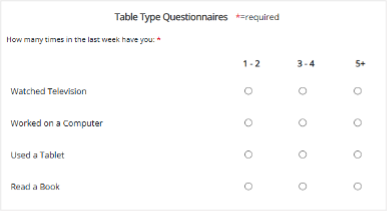
Table-Type Questions
When a question includes multiple items with the same response options, present it in a table format. This makes it easier for patients to review their choices and respond quickly and accurately.
Save as Draft
Patients can now save their intake packet before finishing it and return later to complete it at their convenience.

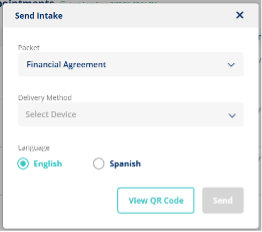
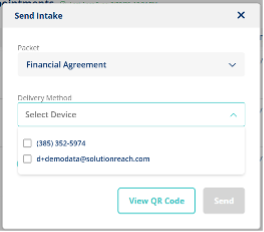
Take Action Calendar Modal
A new modal allows you to send intake packets directly from the Take Action Calendar. When sending from the calendar, you can now deliver intake packets to multiple devices—just like you can from the Conversations Message Thread.
SR Schedule (BETA) – iframe
Introduced a new iframe scheduling option allowing practices to embed scheduling directly into their websites with customizable settings and HTML snippets.
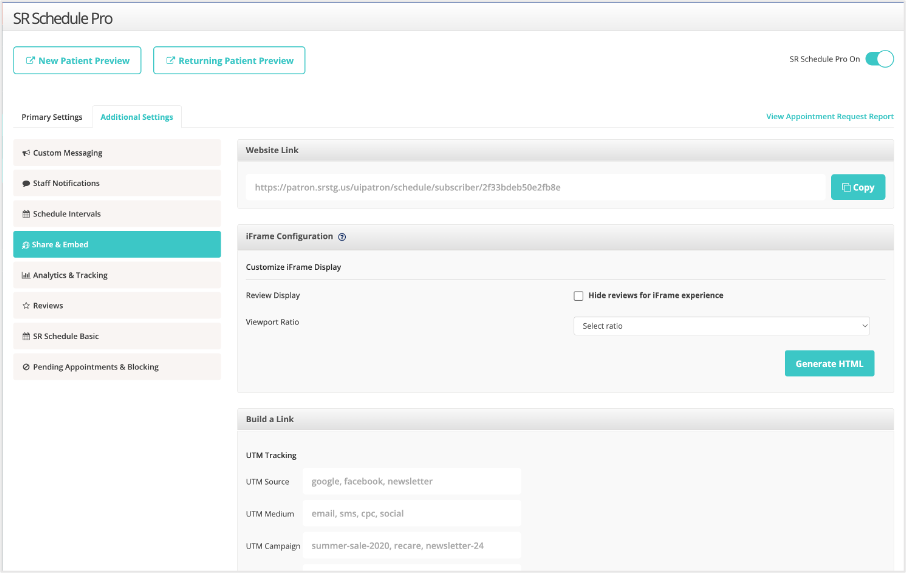
SR Schedule (BETA*) – Phone for Tracking
Added the ability to designate a marketing tracking phone number for SR Schedule, along with UI updates and improved validation for phone inputs.
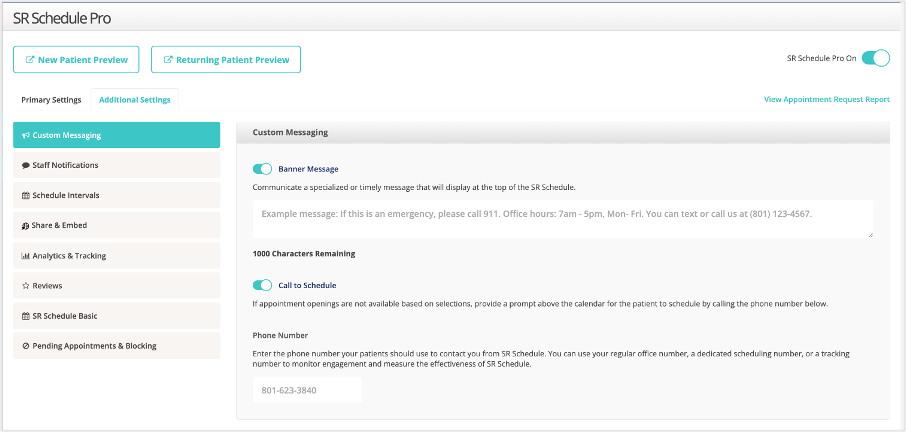
*If you would like to be a part of the Schedule beta, please email product@solutionreach.com with your practice contact information and that you’d like to be a part of the Schedule beta
AI Virtual Assistant (BETA*) – Scheduling
Powered by conversational AI, the SR Virtual Assistant answers calls when your office can’t and guides patients through our natural, easy‑to‑follow scheduling flow. It books appointments on your behalf, helping your practice stay responsive without requiring staff to be available.
*JOIN THE BETA: *If you would like to be a part of the SR Virtual Assistant beta, please email product@solutionreach.com with your practice contact information and that you’d like to be a part of the SR Virtual Assistant beta.

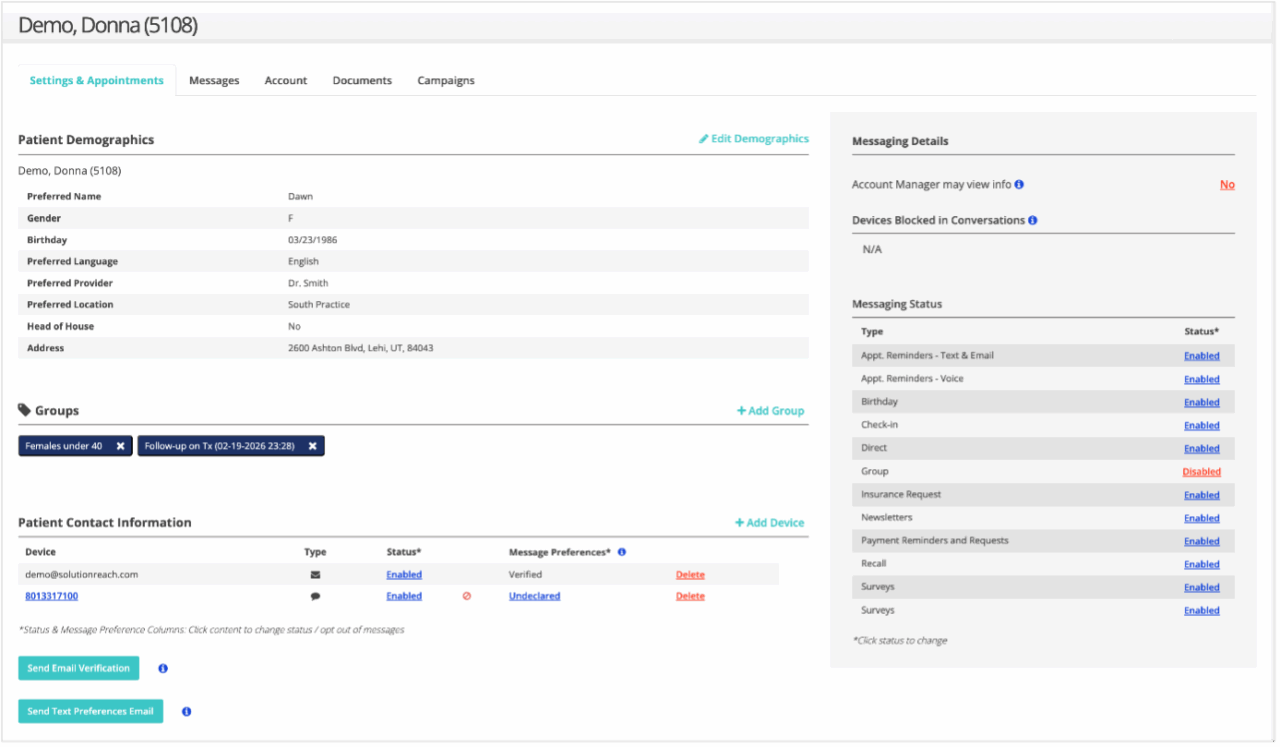
Patient Profile – Refresh
The Patient Profile page has been refreshed with UI improvements to reduce dead clicks and enhance clarity. Updates include a redesigned “add device” experience, clearer action hierarchy, and more consistent and readable section headers. No functional behavior was changed.
Insurance – Dental Insurance Payer Continuous Connections Cleanup
Improved insurance payer connections by removing outdated or duplicate connections and ensuring only one connection per payer per location.
Learn more about Continuous Connections for more effective verifications
Spotlight – Moved Today’s Calls to a New Voice Menu Navigation
“Today’s Calls” has been relocated from the Conversations menu to the new top‑level Voice menu. This update will consolidate voice interactions (think Virtual Assistant in beta) into a dedicated location for clearer navigation.
Location Hub Appointments Report – Updated Kept Statuses
Appointment statuses have been corrected: only scheduled appointments appear as Scheduled, past appointments still marked as scheduled will appear as Scheduled – Past, and future canceled/moved appointments appear as Not Kept, improving reporting accuracy.
Location Hub – Reminder Template Propagation
Propagation now correctly updates template settings across all locations without requiring manual adjustments.
Intake – Page Start Position When Clicking Next
Resolved an issue when clicking Next on intake forms loaded the next page at the middle or bottom. Pages now automatically start at the top.
Intake – Questionnaire Reordering Issues
Table-type questions can now be reordered at any position without causing errors.
Intake – Incorrect Question Number Order on Patient View
Corrected question numbering in the subscriber app for external questionnaires. Patient and PDF views were unaffected.
Intake – Status Showing as Unknown
Fixed an issue where Intake status appeared as “Unknown” in Conversation threads when sent from Patient Profile, Appointment, Action List, or TACAl. Intake statuses now correctly display as Sent, Started, or Completed across all applicable areas.
Conversations – Calendar Showing Wrong Date in UI View
Fixed an issue where the calendar displayed an incorrect date when selecting from the left side. The correct date now appears consistently.
SR Pay – Payment Request Missing Past Appointment
Resolved an issue where the most recent past appointment did not appear in the payment request selector. It now displays correctly.