SUMMARY
This release brings updates across several key areas to help your practice run more smoothly, from reaching new patients faster to verifying coverage in more places:
- SR Schedule: A redesigned booking experience is now live for every SR Schedule client, built to be faster and easier for patients on any device
- SR Conversations: Waitlist (beta) helps you fill last-minute openings by matching them with patients who want in sooner
- Stella: Default response language settings now support English, Spanish, French, or bilingual English/Spanish
- SR Reputation Engine: Review invitation templates updated to comply with Google’s current review policy, plus new send-timing options
- Intake: New table-style question type, continuous demographics view, and a “Fill Out Forms” button in appointment reminders
- SR Schedule: New link builder, custom brand color settings, better returning-patient lookup, and a beta report for reschedules and cancellations
- Location Hub: New Intake report, SR Schedule URLs report, Survey Detail report, and targeted group message propagation for enterprise accounts
- Location Hub Newsletters: New $CSV_URL$ and $CSV_PHONE$ tokens for personalized, trackable links and phone numbers
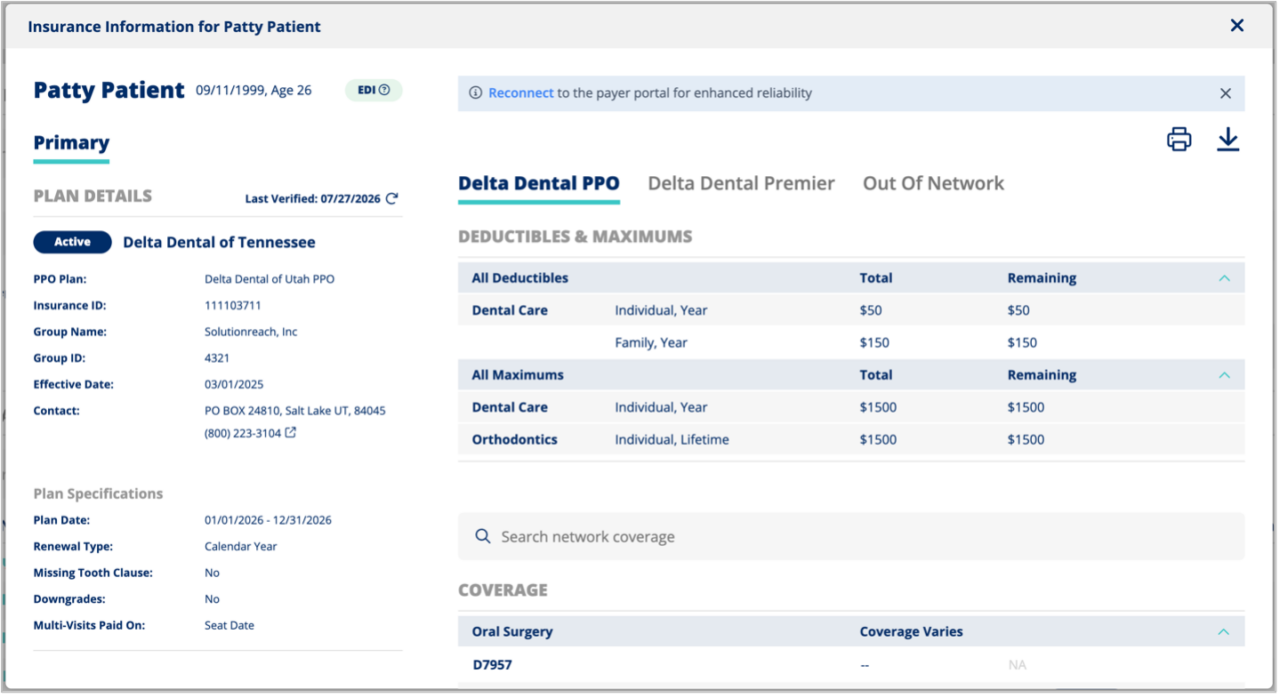
- Insurance: A new banner in the Insurance Snapshot makes it easier to reconnect a disconnected payer portal
- SR Conversations: GoToConnect integration (beta) with separate missed-call SMS templates for office and after-hours
 Insurance — Display Disconnected Payer Portal Banner for Insurance Premium
 Insurance — Display Disconnected Payer Portal Banner for Insurance Premium
Insurance Premium users will now see a prominent banner at the top of the Insurance Snapshot when a payer portal connection is available but not connected, allowing quick access to connect or reconnect without leaving the page. This update also includes a UI fix to prevent long names from causing layout issues in the snapshot section.
Location Hub — Survey Detail Report
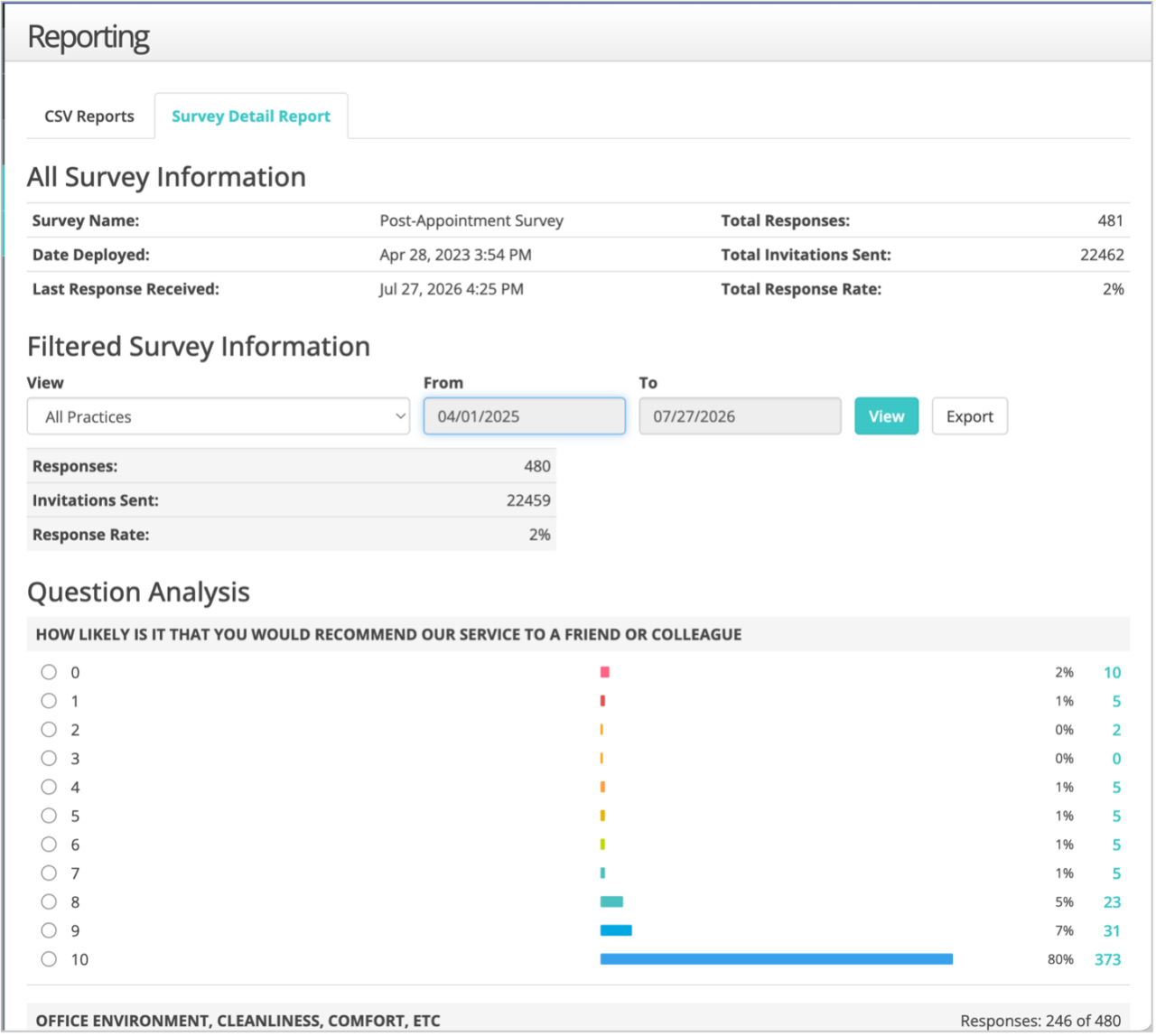
The Survey Detail Report visual from our old Enterprise platform is now available in Location Hub, with the existing report section changed to a CSV Reports tab and a new Survey Detail Report tab added. The new tab matches the previous functionality, supporting filters, drill-downs, and updated styling.
Practice Information Settings
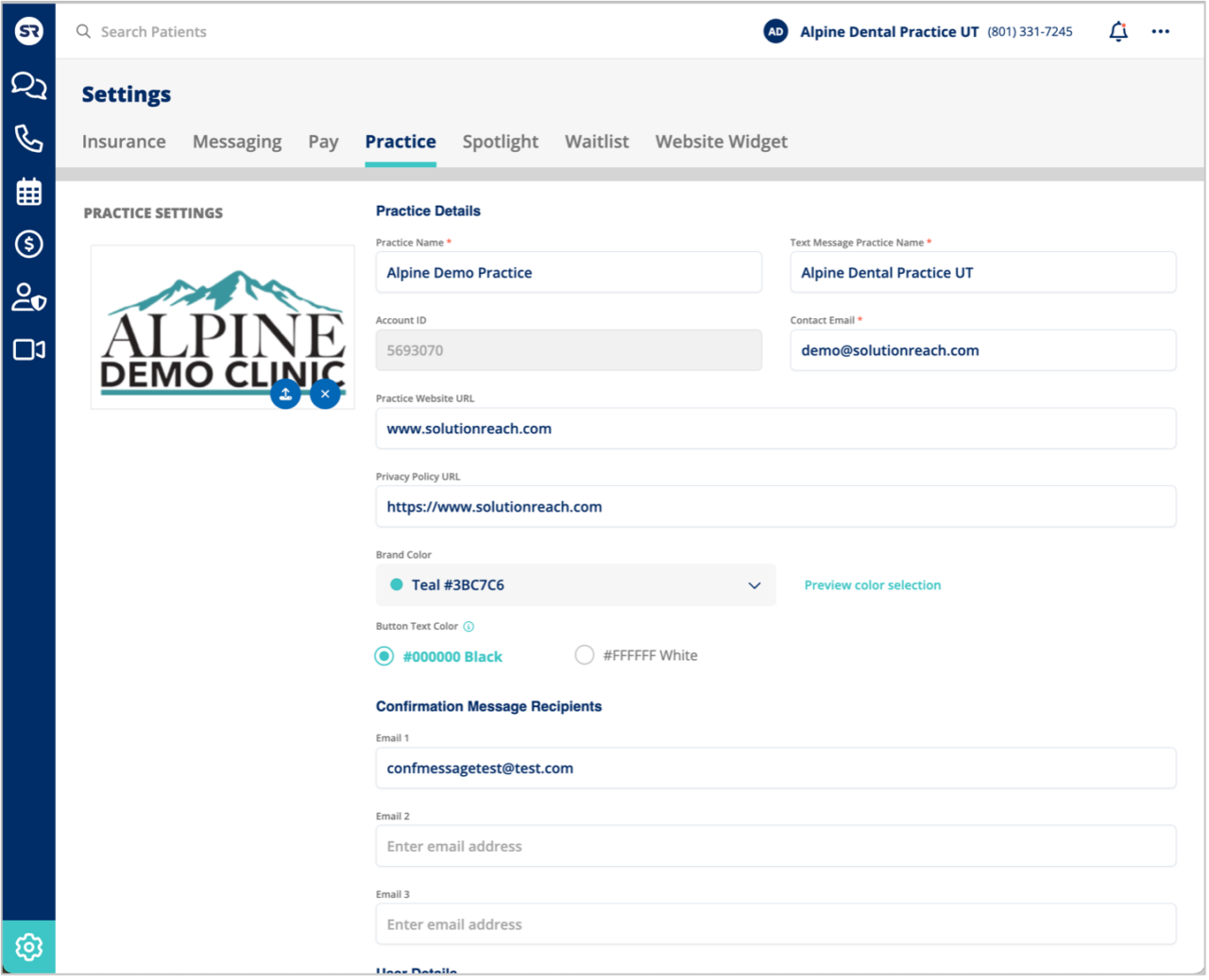
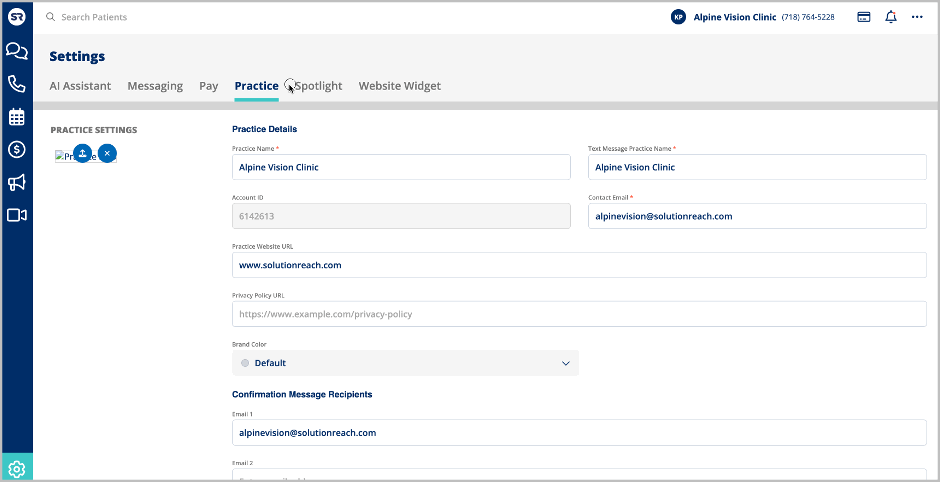
A new Practice Settings page is now available in Conversations, allowing users to add a Privacy Policy URL and manage practice information in a live, editable form. Settings from the legacy page have been migrated, and users can now upload logos, update practice details, and access improved navigation between settings pages.
Schedule: New Experience Enabled for all SR Schedule clients
The Schedule New Experience is now available for all SR Schedule clients. SR Schedule has been redesigned to give your patients a clearer, faster, accessible, and more modern way to request or book appointments online—on any device.
At a Glance:
- A refreshed, mobile-first scheduling experience for patients
- Stronger practice branding, including brand color controls, logos, and privacy policies
- Smarter insurance collection for Dental and Vision practices – automatic verification for Dental Insurance Premium users
- More flexible patient form fields and scheduling terminology
- Share & Embed tools: website links, iframe embed, and campaign tracking (phone & UTM)
- Improved returning-patient matching, preferred provider logic, and multilingual support
- Richer appointment request reporting
SR Schedule: Use Preferred name for patient lookup
The returning patient lookup has been improved to search by both legal and preferred names, with case-insensitive matching and enhanced logic to handle minor first-name typos. This update makes it easier for patients to be found even if they use a preferred name or make small mistakes when entering their information.
SR Schedule: Improved No Preference Logic & Order Control
The logic for assigning providers when a new patient selects ‘no provider preference’ has been updated to randomly distribute appointments among available providers, ensuring a more even spread of new patient bookings. Users can also control the order of the providers and No Preference can be placed anywhere within your provider list.
SR Schedule: Brand Settings
SR Schedule subscribers can now customize their scheduler’s brand colors from a new branding settings section, choosing from default options or entering a custom hex code with compliance validation and live preview. The scheduling UI has also been updated with improved buttons and a new “Edit Branding” option for easier access to branding settings.
SR Schedule: Link Builder
A new link builder is now available in the SR Schedule settings, allowing users to create appointment links targeted by provider, location, and appointment type. When patients use these links, the selected options are auto-filled, streamlining the booking process and reducing friction.
Schedule: Insurance Options – Vision
Vision Schedule now allows practices to configure separate Medical and Vision insurance options, making it easier to collect the correct insurance information from patients during scheduling. The settings UI has been updated for improved flow and clarity, and these changes only affect Vision Vertical accounts.
SR Schedule: Report reschedules and cancelations (beta)
A new report is now available in SR Schedule Pro to track appointment cancellations and reschedules, showing details like patient, provider, original and new appointment times, and change type. Users can filter by date, provider, location, and change type, sort and hide columns, and export the report to CSV.
Getting started: Join our beta by contacting product@solutionreach.com or contacting support. Once this feature is activated, Reschedule and Cancel settings appear within SR Schedule settings.
Spotlight: GoTo Integration and Missed Call Message (beta)
A new settings panel was added to SR Conversations, allowing practice administrators to configure their GoToConnect integration. The UI supports OAuth connection providing a stronger integration for future improvements and features. This GoTo now allows practices to configure separate missed-call SMS templates for office hours and after-hours, ensuring patients receive the right message at the right time. The updated GoTo Connect integration settings include toggles, customizable templates.
Getting started: Join our beta by contacting product@solutionreach.com or contacting support. Once this feature is activated, GoTo settings appear within Spotlight settings.
Virtual Scheduling Assistant (Stella): Update Keyword Processor for SMS Time Settings
The SMS AI Assistant’s keyword processor now respects the configured response hours, ensuring automated replies are only sent when the agent is available. Patients who text outside of these hours will not receive an auto-response, providing a more consistent and expected experience.
Waitlist: View and Send Messages to Fill Open Appointments (beta)
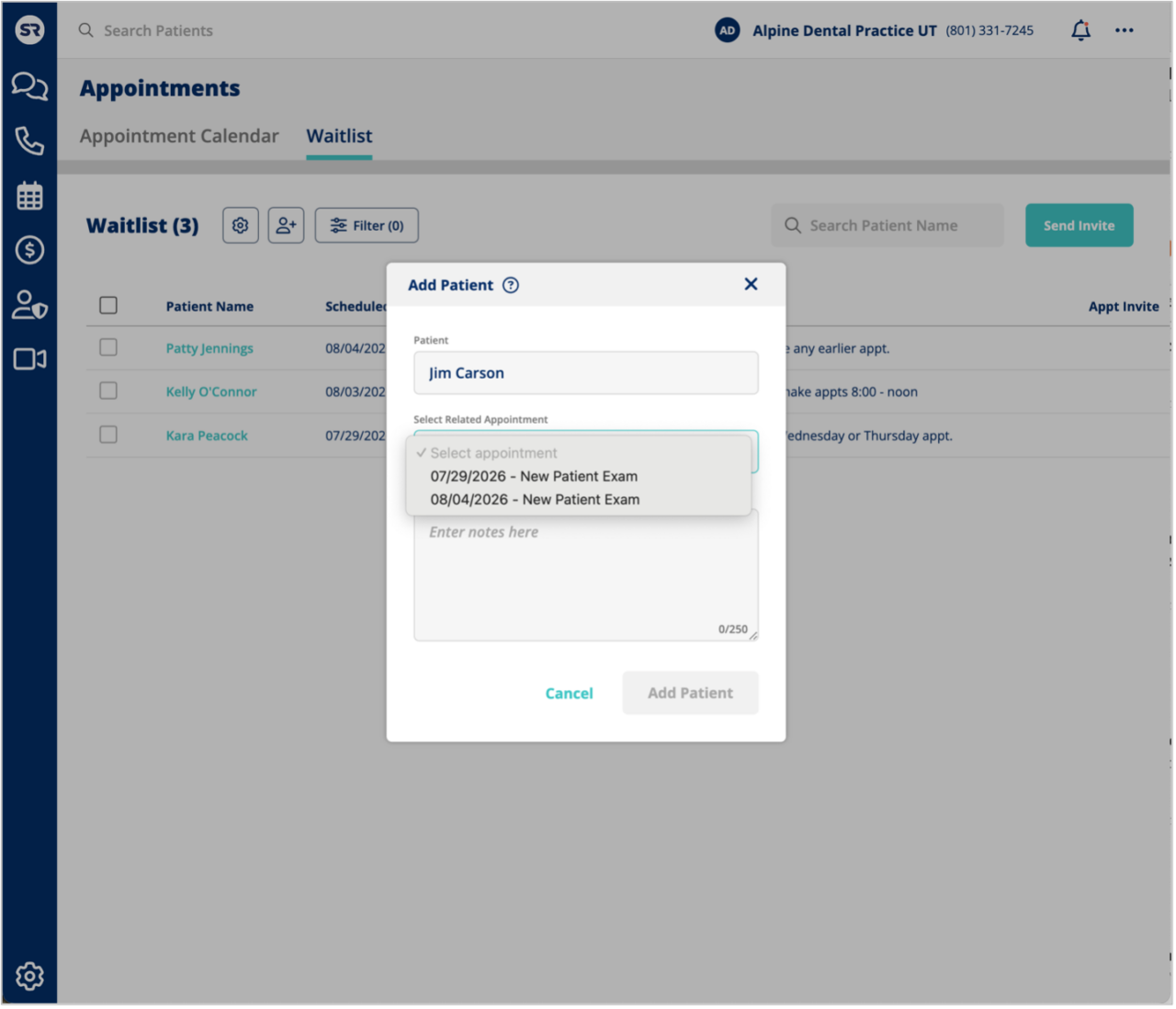
Say goodbye to empty chairs. Waitlist is a brand-new tool built directly into the SR Platform that helps practices instantly fill last-minute cancellations and no-shows. When an appointment opens up, staff can now match it with patients who want to get in sooner, all without leaving Conversations.
What you can do:
- View all waitlist patients in a dedicated table with sorting, search, and filters (by provider, appointment type, or pending invites)
- Manually add patients to the waitlist with a streamlined modal (search patient, pick appointment type, add notes)
- Take action right from each row: flag high priority, edit provider preferences, send invites, manage notes, or jump to the patient thread
- Manage your waitlist within SR or sync automatically with your PMS*
Getting started: Join our beta by contacting product@solutionreach.com or contacting support. Once this feature is activated, a new Waitlist tab appears under Appointments in Conversations.
*Limited PMS supported for full integrations; however, all users are able to maintain and message a waitlist within SR.
Intake: Continuous Demographics
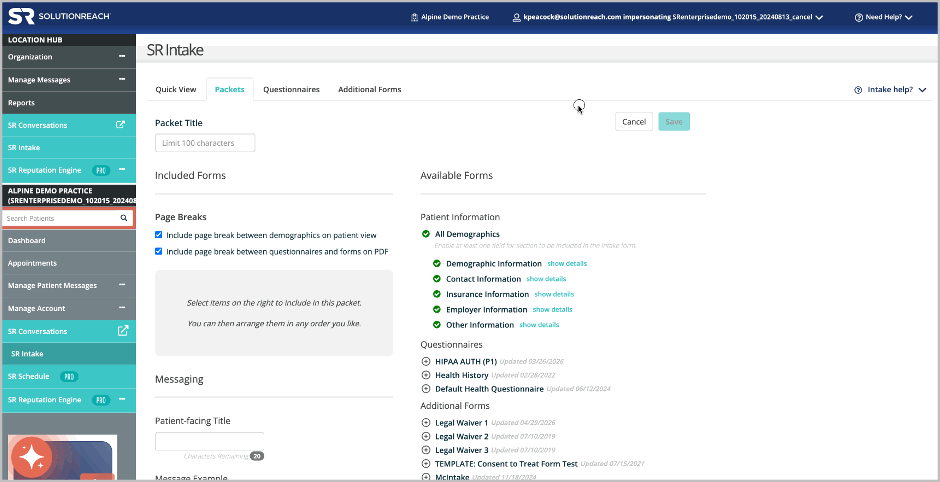
A new option has been added to the Intake packet creation settings that allows users to display all demographic sections continuously on a single page in the patient view, or with page breaks between sections. The patient view updates dynamically based on the selected configuration, improving flexibility for how demographic information is presented to patients.
Intake: Table Type Questions
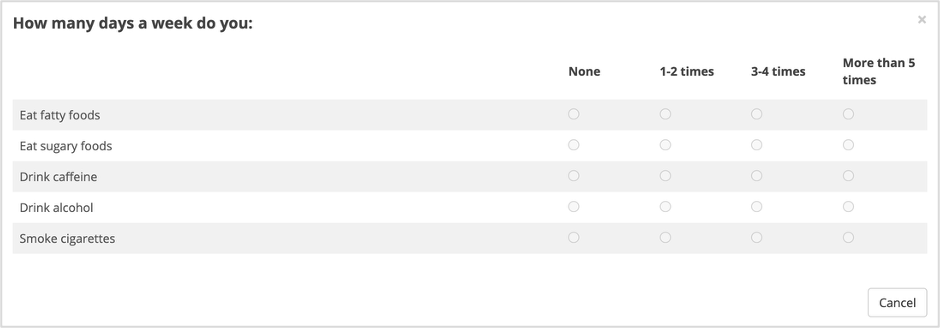
A new “Table – Multiple Answers” question type has been added to Intake, allowing offices to group related questions with a shared set of answers into a table format. Users can create table questions with logical section naming, preview the layout before saving, and edit existing table. On the patient side, respondents see a clear column/row layout, select one option per row, and can change selections before submitting. The table view is also mobile-responsive with improved readability and text wrapping.
Intake: “Fill Out Forms” button in Appointment Reminders
Pre-Visit Instructions emails now include a dynamic “Fill Out Forms” button for Intake, making it easier for patients to access their forms. The button appears in emails, while SMS messages continue to provide a direct link. The button now displays on its own line, centered beneath the message content, and uses the same fill color as the “Confirm Now” button. .

Location Hub: Group Message Controlled Propagation
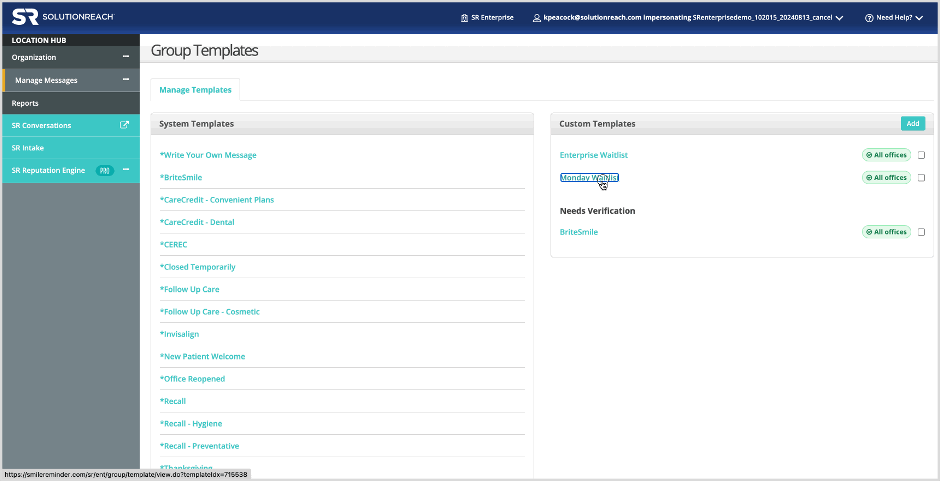
Location Hub now allows users to assign group message templates to specific offices, rather than all locations, supporting enterprise needs for targeted communication. The update includes options to assign templates to all or selected offices, search and manage assignments, and improved UI elements for template management and visibility.
Location Hub: Newsletters Text/image link option for the CSV_URL token
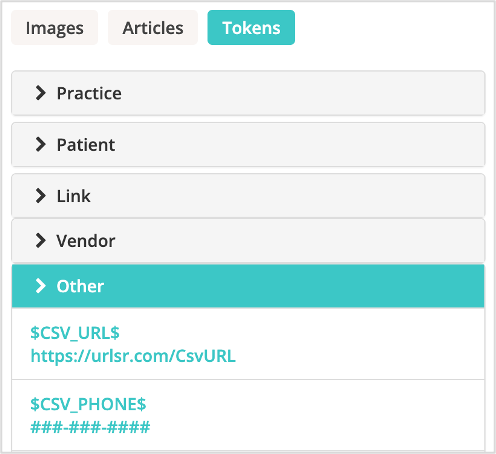
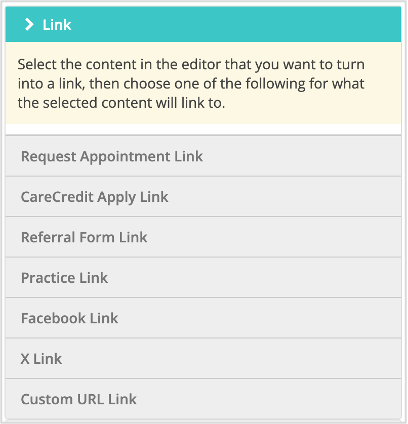
A new button option for the Custom URL Link ($CSV_URL$ token) is now available in Location Hub Newsletters, allowing users to insert personalized, trackable links as buttons or text in emails. If a patient group CSV upload is missing URLs, users will see a warning and sending will be blocked until the user makes the necessary changes.
Location Hub: Newsletters Phone Token CSV Upload
Enterprise accounts can now use the $CSV_PHONE$ token in newsletters to include and track patient phone numbers from CSV uploads. Supported phone formats in the upload are ###-###-#### and ##########, and a warning is shown if the CSV does not contain phone numbers. The token is available in both texting and email newsletter options.
Location Hub: Intake Report
A new Intake report is now available in Location Hub, providing users with a centralized view of intake activity across selected practices and date ranges. The report includes key details such as appointment information, packet status, and messaging history, and can be exported as a CSV file for further analysis.
Location Hub: SR Schedule URL Report
The difference between a text link and a well-placed button can be the difference between an email that drives clicks and one that gets skimmed. The CSVURLCSV_URL token in Location Hub Newsletters now supports a button option alongside text links, so your team can insert personalized, trackable links in either format. A warning also blocks sending if a patient group CSV upload is missing URLs.

Privacy Policy: SR Schedule & Check-In
Practices can now add a Privacy Policy link to their Practice Settings to have it appear on the SR Schedule and Check-in footers, making it accessible to patients during scheduling and check-in. The link appears on both Basic and Pro versions, in mobile and desktop views, and opens the provided URL in a new tab . If no URL is set, the Privacy Policy link does not display.
SR Reputation Engine: Review Invitation Templates Updated for Google Compliance
Review invitation templates in SR Reputation Engine have been updated to use neutral, balanced language in compliance with Google’s updated review policy. The default template is now “Trusting Our Practice,” which asks all patients for an honest review of their experience rather than steering only satisfied patients toward leaving a review.
SR Reputation Engine: Provide Sending Options
SR Reputation Engine PRO users can now choose when automated review invitations are sent after a completed appointment, including a new same-day, next-day, 1-week, and 2-weeks options. If same-day is selected, the system ensures invites are sent at least 90 minutes after the appointment, respects frequency limits, holiday restrictions, and legal time windows, and only sends invites for kept appointments from the PM sync.
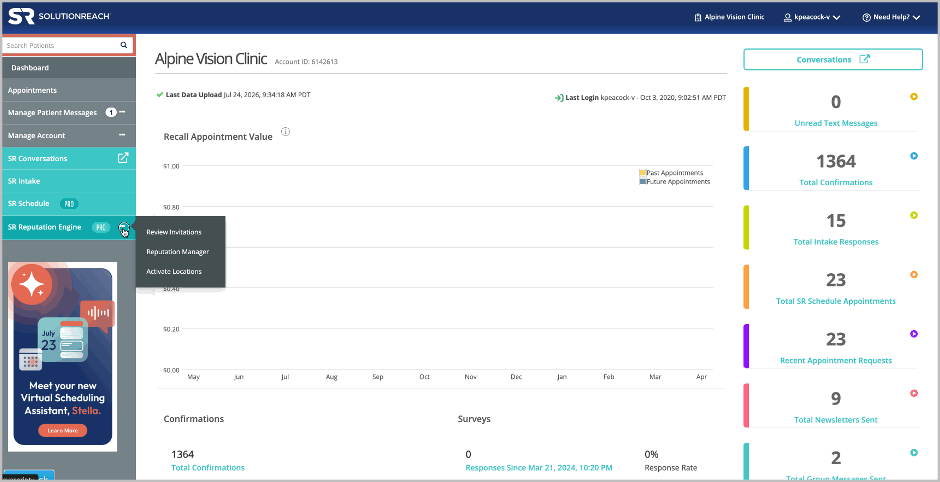
Virtual Scheduling Assistant (Stella): Updated Language and Voice options in settings
You can now set Stella’s default response language. A new Assistant Language dropdown on the AI Assistant settings page lets you choose between English, Spanish, French, or Bilingual (English/Spanish). The Assistant Voice dropdown will automatically filter to show only voices that match whichever language you select.
Good to know: Stella can actually understand and respond in any supported language regardless of this setting — this dropdown just sets her default starting language. So if you select Spanish, she’ll default to answering in Spanish; French, she’ll default to French.
Our recommendation: if the majority of your patients are English-speaking, keep the default English setting. Only select Bilingual if Spanish-speaking patients make up more than 50% of your patient population — that’s where it makes the biggest difference for the patient experience.
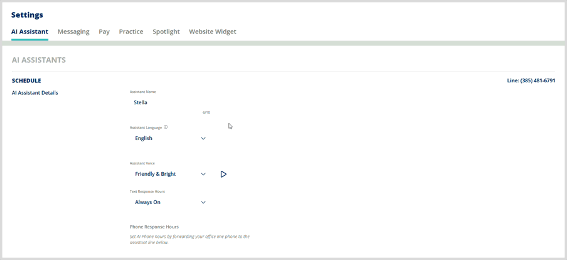
Virtual Scheduling Assistant (Stella): AI Settings Disable Forwarding and Take Message
A new “Disable Forwarding and Take Message” option has been added to the AI Settings page. When enabled, the AI assistant will no longer transfer calls to the office and will instead take a message from the caller for follow-up.
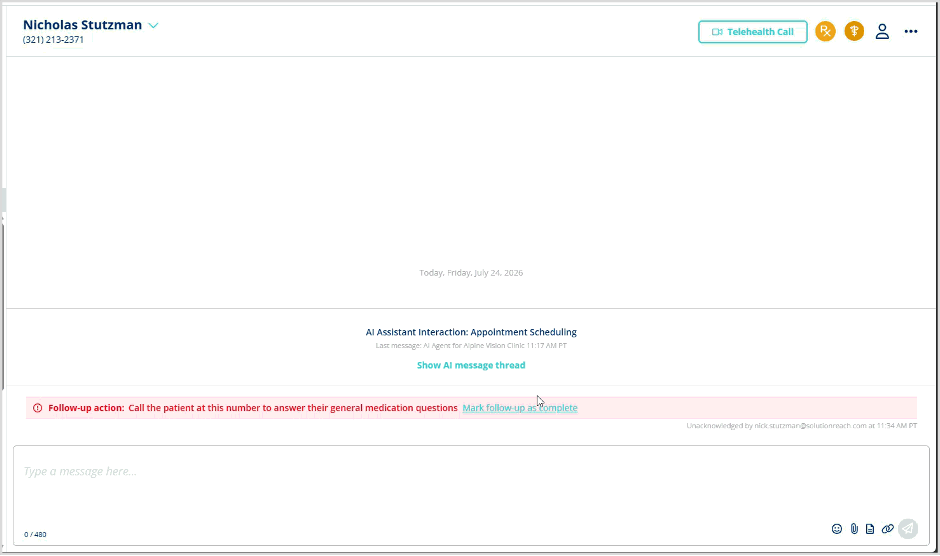
Virtual Scheduling Assistant (Stella): Updated action banner to on SMS to be acknowledge and un-acknoweldge able
The SMS virtual assistant action banner now allows users to acknowledge and unacknowledge actions, shows who last updated the banner and the timestamp, and displays the conversation topic in the AI summary. The banner design has been updated to match the Voice Transcripts style, including color and layout improvements.
Virtual Scheduling Assistant (Stella): Updated Auto SMS Response for text agent
The auto SMS response for appointment-related texts has been updated to use more general language, reflecting the agent’s ability to schedule, reschedule, cancel, and confirm appointments. The list of keywords that trigger the agent was expanded in English, Spanish, and French, and the new response is sent in the appropriate language unless a human has replied within the last 3 minutes.


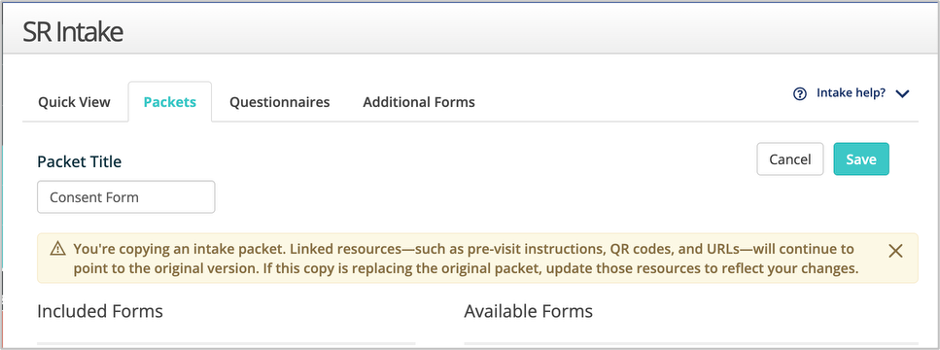
Intake: Copy warning
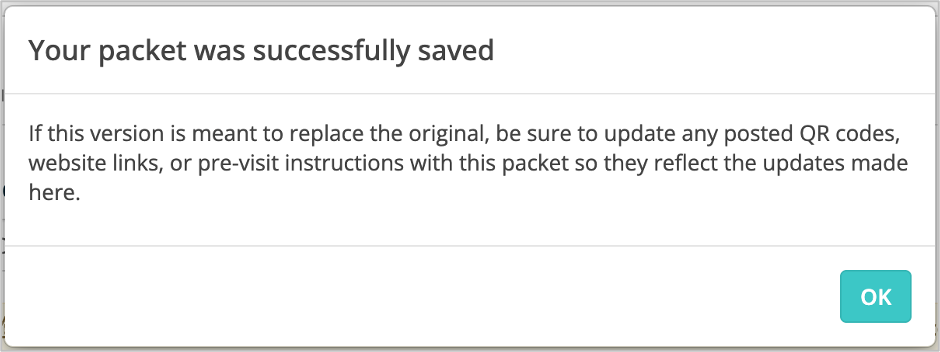
When an office user copies an intake packet, a warning now appears at the top of the copied packet to remind them to update QR codes, URLs, and pre-visit instructions. After saving, a modal also reminds users to update any posted resources if the new version is meant to replace the original.
Intake: Location Hub Disable Generic URL/QR Code
The options to copy packet URL, download QR code, and print QR page are now disabled at the Location Hub level, with tooltips directing users to perform these actions at the practice level. Practice-level packet actions are not affected by this change. .
Intake: Consistent Send Modal for Intake
The send modal experience for intake packets is now consistent across all sending locations. Completed intake packets cannot be resent for the same appointment, while incomplete packets can be resent using the same link, reducing user confusion and improving workflow reliability.
Intake: Questionnaire Scrolls Right Instead of Down
Fixed an issue where the “Health History Update” questionnaire in SR Intake required horizontal scrolling on mobile devices for multi-answer questions. Options are now displayed in two columns on mobile, making the form easier to use.
Surveys: Remove link under button
The survey email template has been updated to remove the duplicate survey link that appeared below the “Take the Survey” button. Now, only the button is shown, resulting in a cleaner and more streamlined email for recipients.
Conversations: Patient profile appt times are wrong for some users
Fixed an issue where appointment times in the SRC patient profile displayed incorrectly for some users due to a time zone mismatch. Appointment times now consistently show the correct time based on the practice’s time zone.
Conversations: Error showing when sending to a number not tied to patient
Resolved an issue where sending an Intake Request to a phone number not tied to a patient record caused an error message to appear. Users can now send intake forms to unassociated numbers without seeing the “Unknown Error”.
Email: Alias showing as sender name of newsletter instead of practice name
Resolved an issue where the sender name for newsletters appeared as the email alias in Gmail instead of the practice name, after Gmail made an update to their email system. Newsletters now consistently show the practice name as the sender across all email clients.
Groups: Manage Groups
The Manage Groups page UI was updated with improved button scaling, added column names, adjusted column spacing, updated action/copy button containers, and refreshed the info icon’s scale and placement. These changes are visual only and do not affect functionality outside of an improved user experience.
Insurance: Only Show MFA Modal on Reauthentication
The MFA modal for insurance integrations now only appears when reauthentication is required, streamlining the reconnection process and reducing errors. Users can disconnect and reset their connection if needed.
Intake: Improved Sending from Take Action Calendar & Message Threads
Users can now send intake forms directly from both Conversations and Take Action Calendar with enhanced options. When sending a form, users select the patient’s device(s) (including email), optionally associate the form with an upcoming appointment, and choose a packet. If only one device is available, it auto-selects. A QR code is also available when sending from Take Action Calendar. Duplicate protection prevents the same packet from being sent twice for a single appointment (already-sent packets appear disabled in the dropdown). If a form needs to be re-sent, a dedicated “Resend Packet” option sends the same URL so patients can pick up where they left off.
Location Hub: Updates to Newsletter Detail Report View
in the all-sent and individual views, with updated layout and table columns for improved clarity. The unsubscribe percentage is calculated based on unique unsubscribe clicks divided by newsletters sent, and UI adjustments ensure better alignment, spacing, and usability across devices.
Location Hub: Unable to Save Newsletter Campaign
Resolved an issue where saving campaign drafts in Location Hub would fail for large enterprise audiences. The update improves performance and reliability when saving campaigns with large recipient lists.
Location Hub: Manage Users – Alphabetize Users
The Manage Users list in Location Hub now displays users in alphabetical order by last name, then first name, including pending invites. Sorting is case-insensitive and remains consistent when filtering or searching the list.
Message Editor: Replace TinyMCE with Jodit Editor
Replaced TinyMCE with Jodit Editor in all areas where the rich-text editor is used throughout the platform. Existing functionality has been maintained to match the previous TinyMCE implementation.
SR Schedule: Don’t display patient type options without appt types
Replaced TinyMCE with Jodit Editor in all areas where the rich-text editor is used throughout the platform. Existing functionality has been maintained to match the previous TinyMCE implementation.