
SUMMARY
This release brings updates across several key areas to give your practice clearer performance data, more flexible intake tools, and more guidance throughout online scheduling:
- SR Conversations: A new messaging performance dashboard (Beta), collapsible folders, and role-based settings provide clearer information and control
- Group Messages: Carrier-limit warnings help practices plan mass texts, while updated clinical-code statuses make Criteria Groups easier to build
- SR Intake: Patient image collection (Beta), resumable forms, clearer insurance fields, easier resends, and preserved packet links expand how practices collect and manage patient information
- SR Intake and Secure Docs: Practice details and privacy policy links now appear in a consistent, accessible footer
- Location Hub: Campaigns are now available to all enterprise accounts without additional enablement
- SR Schedule: Patient lookup, insurance guidance, and clearer booking confirmations help patients follow the appropriate scheduling path
- Appointment Reminders: Staff can preview reminders in any configured alternative language before using them
- AI Assist: Updated usage totals make it easier to compare activity with the amount included in your plan
 More detailed messaging performance data (Beta)

Practices can now review text and multimedia messaging performance through a new dashboard in Conversations. An executive summary provides a quick view of key measures, trends, delivery health, unanswered conversations, and business-texting registration status before you explore the detailed charts and tables.
Choose a date range to see detailed results include message volume, delivery rates, carrier performance, common failure reasons, conversation activity, and comparisons with the previous period. These insights help you assess performance, identify delivery issues, and determine where follow-up may be needed.
This dashboard is in beta and being released in phases and may not be available to every account immediately.
Keep posted intake links active when copying a packet
When you copy an intake packet, you can now move its existing posted QR codes and website links to the new copy. Patients will reach the updated packet without requiring the practice to reprint signs or replace posted links.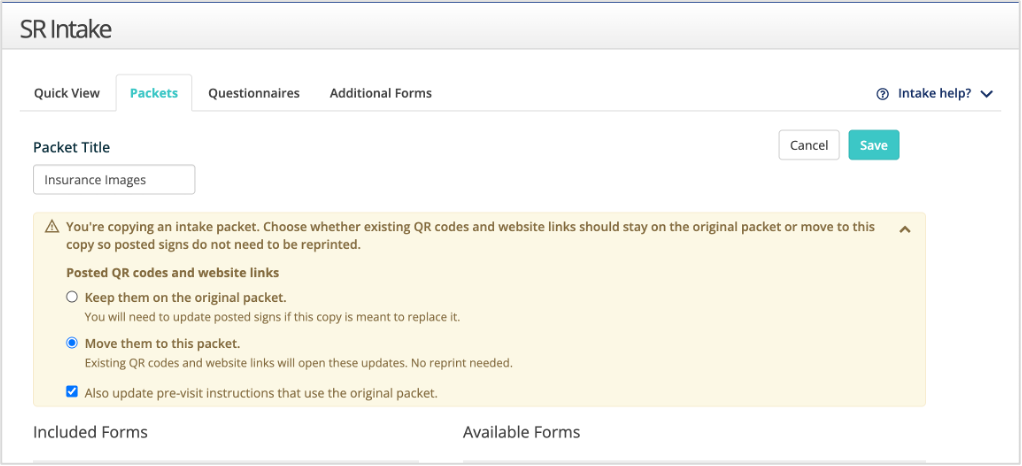
Display your privacy policy in SR Intake and Secure Docs
SR Intake and Secure Docs now includes a footer with the practice name and address. If the practice has provided a privacy policy URL, the footer also displays a Privacy Policy link. The accessible footer appears on mobile and desktop, and the policy opens in a new browser tab.
Automatically direct new and returning patients
A new Patient Lookup Mode can use a patient’s name and date of birth to determine whether the patient is new or returning, then route them to the appropriate scheduling path. This reduces the chance that patients choose the wrong path and limits the corrections staff need to make later.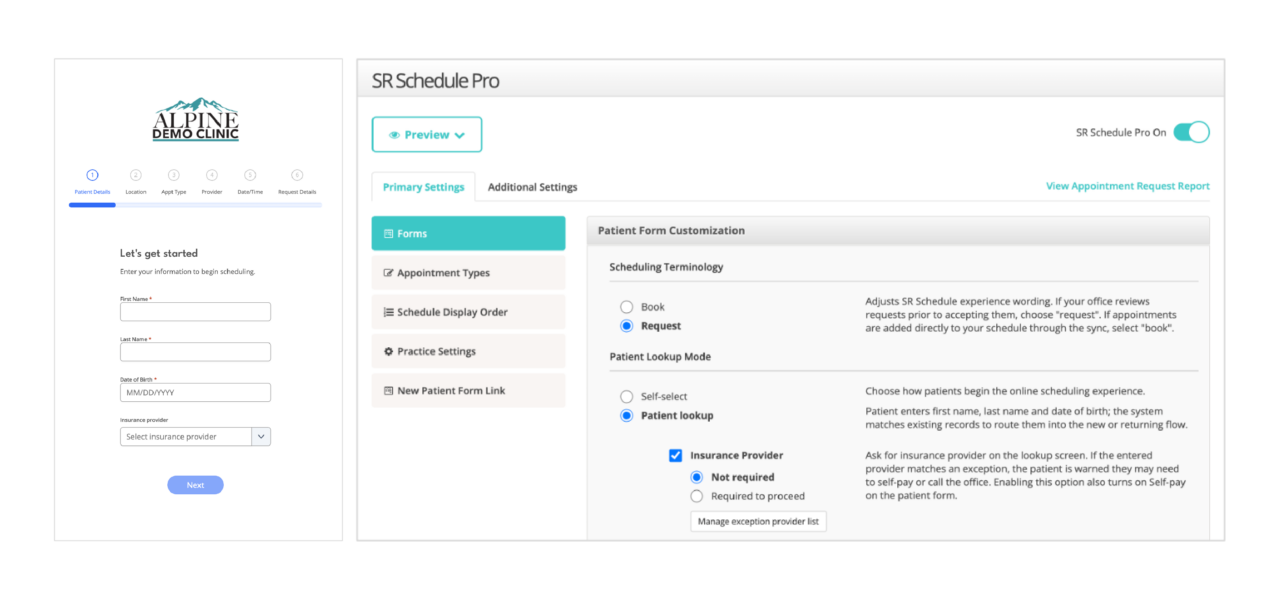
Show insurance guidance before a patient schedules
Patients scheduling online can now see an alert when the insurance they select isn’t accepted or requires them to call the practice, based on the practice’s settings. The alert provides the appropriate next step, such as continuing as a self-pay patient or calling the office.
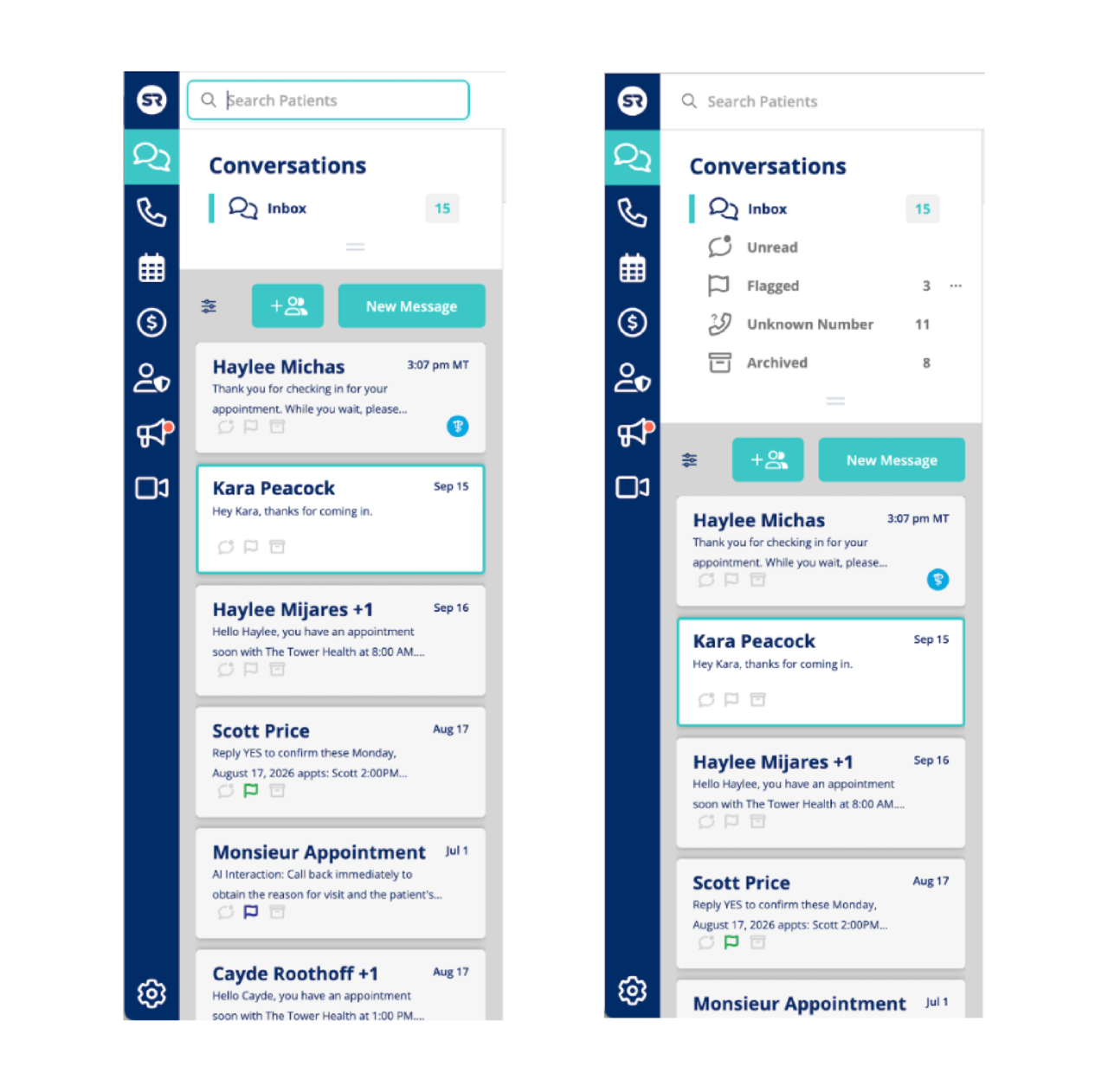
 See more conversations by collapsing message folders

When message folders take up too much space, you can now collapse that section to see more conversation threads at once. Conversations remembers your preference between sessions. The Take Action Calendar also uses the updated collapse design and remembers whether you left it open or closed.
See carrier sending limits before sending mass texts
Mass-texting screens now display AT&T and T-Mobile sending-limit warnings before you send. These warnings appear in Group Messages and enterprise newsletter text sends, helping you plan large sends around carrier limits and reduce the risk of reaching those limits before priority messages, such as appointment reminders, are delivered.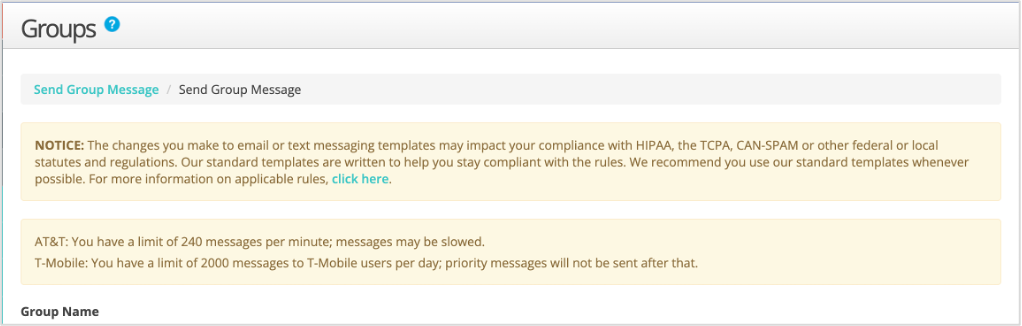
Updated and identify active and inactive clinical codes in Criteria Groups
Mass-texting screens now display AT&T and T-Mobile sending-limit warnings before you send. These warnings appear in Group Messages and enterprise newsletter text sends, helping you plan large sends around carrier limits and reduce the risk of reaching those limits before priority messages, such as appointment reminders, are delivered.
Add a new patient’s date of birth when sending intake forms
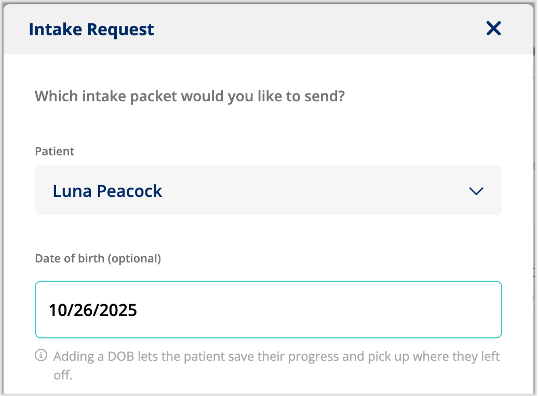
The Send Intake window now includes an optional Date of Birth field for new patients. When a date of birth is included, patients can save an incomplete form and later resume it using their name and date of birth. The Patient Name field also now includes example text to make data entry clearer.
Clearer, more consistent insurance fields in Intake
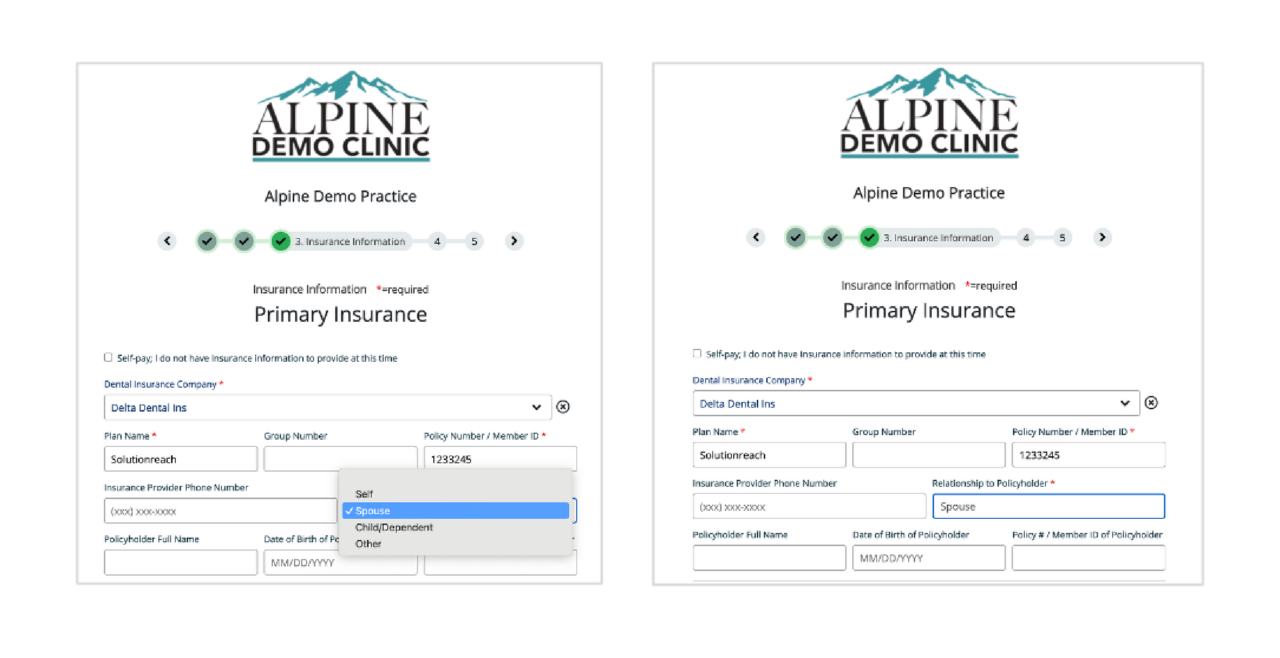
Insurance sections in Intake now use consistent field names and a clearer field order. A new Relationship to Policyholder list displays the appropriate follow-up fields based on the patient’s selection. The same updates appear in Intake settings and downloaded PDFs. If the practice requires a field that was hidden from the patient, the PDF displays it as “N/A.”
Campaigns now available to all enterprise accounts
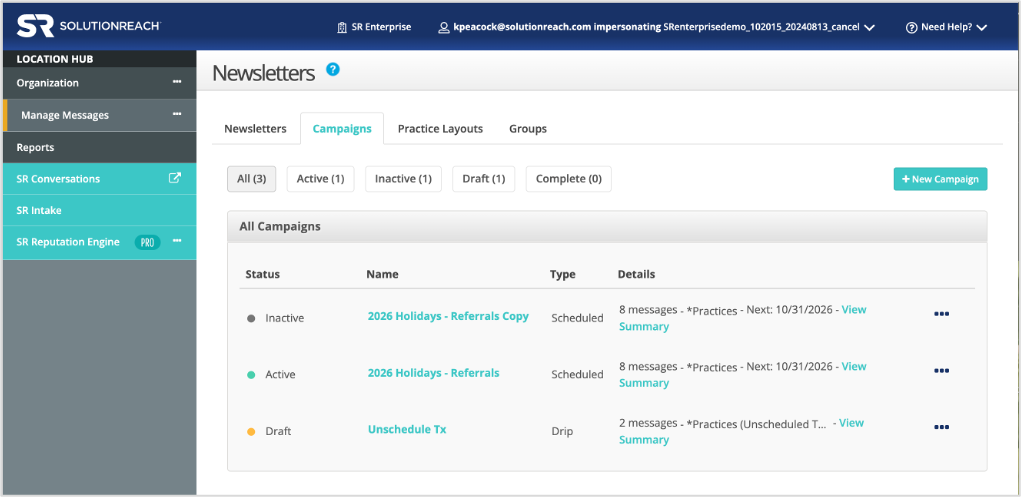
Campaigns are now available to Location Hub customers without additional enablement. This includes scheduled newsletter sends, drip campaigns, and other scheduled campaigns.
Clearer confirmation after booking or requesting an appointment
The SR Schedule success page now uses different messages for booked appointments and appointment requests, making it clear when an appointment still needs confirmation. Request pages no longer include Add to Calendar, which helps prevent patients from saving an unconfirmed appointment. The option to call the practice remains and uses the office’s configured phone number.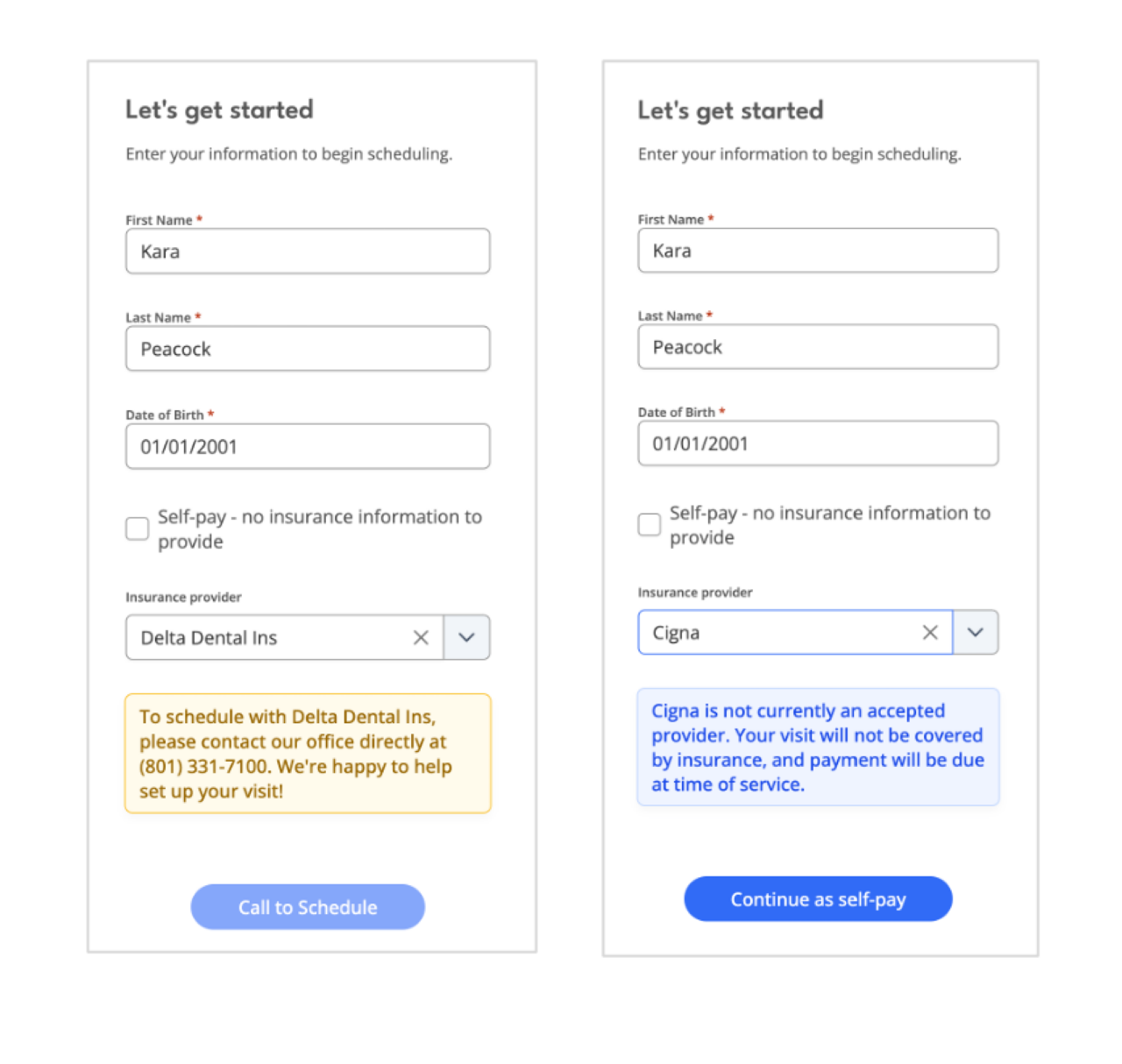
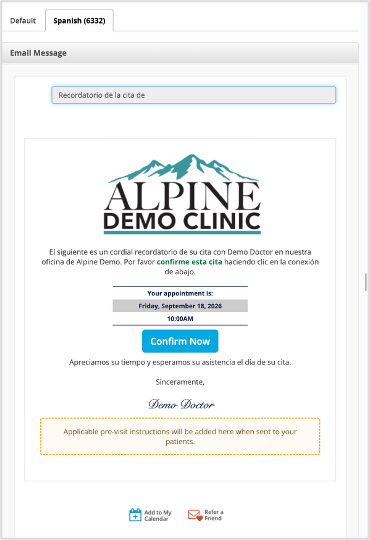
Preview appointment reminders in alternative languages
You can now preview an appointment reminder in any configured alternative language directly from the preview screen. This lets staff confirm the exact message a patient will receive in their selected language before the reminder is used.
Compare AI Assist usage with your plan
The AI Assists widget now shows total usage alongside the amount included in your plan, replacing the previous Unused credits measure. A new indicator appears when usage exceeds the included amount, making it easier to understand current usage at a glance.

Role-based access for payment and practice settings
Practice settings and payment tools now follow each user’s assigned role. Admin users can make changes, while non-admin users have view-only access. This prevents unauthorized changes while allowing team members to view the information they need.
Collect and access patient images throughout the intake process (Beta)
Practices will be able to request insurance card images, patient ID images, and patient photos on intake forms. Patients can upload an existing image or capture a new one, and practices can require images before submission. Images are retained when patients save forms as drafts, so they don’t need to upload them again.
On patient forms, insurance cards appear in the Insurance section, ID images in Other Information, and patient photos in Demographics.
Submitted images are securely stored and included in downloaded and printed intake PDFs. Images are also included in PDFs used for supported writeback workflows.
Staff can access insurance card images submitted through intake, scheduling, and insurance request workflows from the Images section of patient details. Customers can also view uploaded insurance cards, patient IDs, and patient photos within the Images section of the patient details panel. Depending on the workflow, staff can view, download, or delete these images.
Supported images are JPG, GIF, HEIF, HEIC, or PNG files under 10 MB and no more than 500 pixels in either dimension.
Resend intake forms without an appointment
Practices can now resend an intake form from Quick View even when the form isn’t linked to an appointment. This fixes the error that previously blocked those resend attempts.